Reviews
Ihre Grafiken verleihen meinen Präsentationen eine nette Note, und ich habe sie kürzlich für eines meiner All-Hands-Meetings verwendet. Ihre Toolbox verleiht meinen Folien Professionalität, anstatt Standard-Clipart zu verwenden.
Ich brauchte einen neuen Blick auf einige meiner Folien. Ich habe versucht, einen Weg zu finden, einen Pinselschlag-Effekt zu erzielen, um zu unterstreichen, hervorzuheben, Farbe hinzuzufügen, und die handgeschriebenen Markierungen waren genau das Richtige. Sehr einfach zu bedienen, leicht in der Größe zu ändern, die Farbe zu ändern. Es war eine erschwingliche, perfekte Lösung und ich empfehle sie gerne weiter.
Die klare, saubere Optik der Grafiken und die Tatsache, dass ich die Farben leicht bearbeiten und an die Vorlage anpassen konnte, war mein Hauptgrund für den Kauf.
Description
Roadmap Growth Diagram - 4 items
Slide Content:
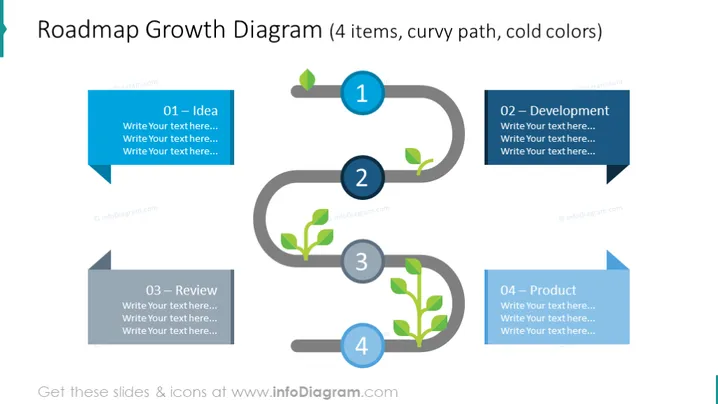
The slide is designed to represent a growth roadmap, detailing the progression of a project or product from inception to completion. It consists of four sequential stages: "01 – Idea," where initial concepts are generated; "02 – Development," where those ideas begin to take shape; "03 – Review," where the developments are evaluated and refined; and "04 – Product," which represents the final, market-ready outcome. Each stage is meant to be described in the text placeholders provided.
Graphical Look:
- A curvy, grey path that interconnects four different stages, creating a visual flow from left to right.
- Each stage is marked by a circular node with a leaf icon inside, symbolizing growth, and a number indicating the sequence.
- Colored banner-like text boxes adjacent to each node, varying in shades of blue, where text can be added.
- The nodes are connected by a path that curves around each point, emphasizing the idea of progression and development.
The overall design is sleek and modern, using a path with nodes to effectively represent a development journey. The use of cold colors and clean lines gives the slide a professional and polished appearance.
Use Cases:
- To illustrate the timeline of a project from concept to launch in business strategy meetings.
- As a visual aid in product development discussions to outline key milestones.
- For presentations to investors, detailing the stages of company growth or product maturation.
- In educational settings, to explain the step-by-step process of bringing an idea to fruition.
How to Edit
How to edit text & colors

How to expand / shorten diagram

How to Replace Icons in infoDiagram PPT


