Reviews
Your graphics add a nice touch to my presentations and I recently used them for one of my all-hands meetings. Your toolbox adds professionalism to my slides. Instead of using standard clipart.
I needed a fresh look at some of my slides. I've tried to find a way to create a paintbrush effect, to underline, accentuate, add some color and the handwritten markers were just the things. Very easy to use, easy to size, change the color. It was an affordable, perfect solution and I'm happy to recommend it.
The crisp, clean look of the graphics, and the fact that it allowed me to easily edit and change the colors to match the template was my main reason for purchasing them.
Description
360 Degree Feedback Dashboard
Slide Content
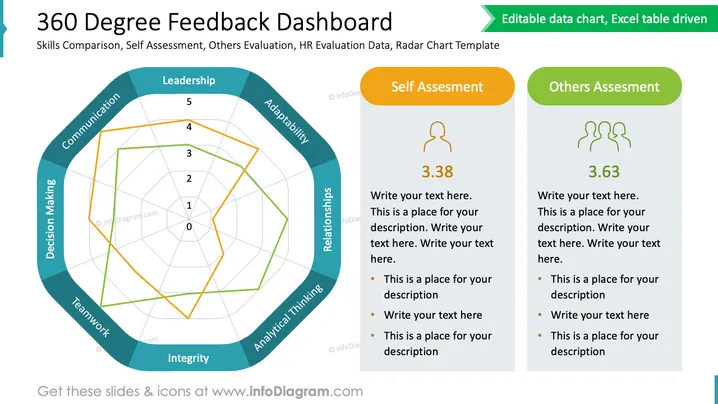
The slide introduces a "360 Degree Feedback Dashboard," focusing on skills comparison, self-assessment, others' evaluation, HR evaluation data, and providing a radar chart template. The dashboard is divided into three parts: "Leadership," "Self Assessment," and "Others Assessment." Leadership skills are visually represented by a radar chart that includes metrics like Communication, Adaptability, Relationships, Analytical Thinking, Integrity, Teamwork, and Decision Making, showing a comparison of perceived skills. Self Assessment and Others' Assessment sections have numerical scores—3.38 and 3.63, respectively—followed by customizable bullet-point text placeholders for detailed descriptions.
Graphical Look
- There's a large radar chart occupying the left half of the slide, with different colored lines representing measurement scales.
- Two rectangular boxes on the right side are labeled "Self Assessment" (orange) and "Others Assessment" (green).
- Each box contains a silhouette icon representing an individual or group, respectively.
- Numerical scores are prominently displayed within these boxes.
- Bullet points below the scores provide space for additional text.
- The colors on the slide are a mix of blues, greens, and oranges, which create a contrasting, attention-catching effect.
The slide has a clean, professional design with good use of colors to differentiate sections and highlight specific information. The layout effectively balances the graphical elements with the textual components to create a clear and informative visual.
Use Cases
- Presenting employee performance reviews to highlight self versus peer evaluations.
- Conducting HR training on how to interpret and utilize 360-degree feedback in performance appraisals.
- Demonstrating the comprehensiveness of a feedback system in leadership development programs.
- Including in business meetings to discuss personal development plans and objectives with individual employees or teams.
How to Edit
How to edit text & colors

How to expand / shorten diagram

How to Replace Icons in infoDiagram PPT


