

Your graphics add a nice touch to my presentations and I recently used them for one of my all-hands meetings. Your toolbox adds professionalism to my slides. Instead of using standard clipart.
Claude Jones, Director of Engineer, @Walmartlabs, USA

Your graphics add a nice touch to my presentations and I recently used them for one of my all-hands meetings. Your toolbox adds professionalism to my slides. Instead of using standard clipart.
Claude Jones, Director of Engineer, @Walmartlabs, USA
I needed a fresh look at some of my slides. I've tried to find a way to create a paintbrush effect, to underline, accentuate, add some color and the handwritten markers were just the things. Very easy to use, easy to size, change the color. It was an affordable, perfect solution and I'm happy to recommend it.
Anonymous, US
The crisp, clean look of the graphics, and the fact that it allowed me to easily edit and change the colors to match the template was my main reason for purchasing them.
Brandie Jenkins, E-learning Developer, USA
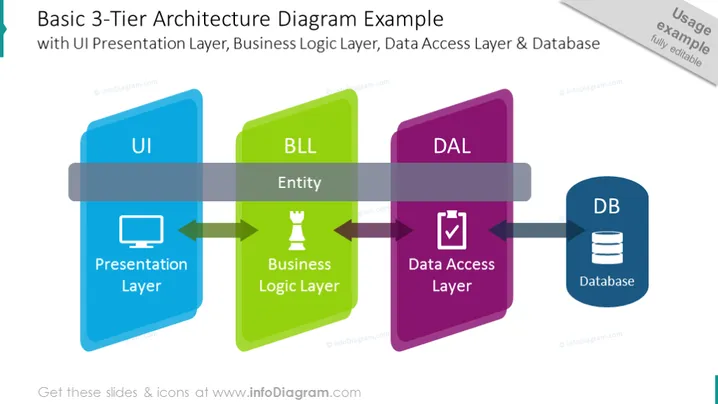
The slide presents an overview of a Basic 3-Tier Architecture Diagram with its three main components: UI Presentation Layer, Business Logic Layer (BLL), and Data Access Layer (DAL), leading to a Database (DB). The UI, depicted in blue, represents the Presentation Layer where users interact, whereas the BLL, shown in green, contains the Entity, representing Business Logic Layer where core processing occurs. The DAL in purple manages the Data Access Layer, which orchestrates communication with the DB, illustrated in dark blue, symbolizing the data storage component.
The visual composition uses vibrant, contrasting colors for each layer: blue, green, and purple, which helps to clearly distinguish each architectural tier. The blocky rectangles and connecting arrows imply a flow of information, while icons provide quick visual cues about each layer's function.



