
Reviews
Sus gráficos añaden un toque agradable a mis presentaciones y recientemente los usé para una de mis reuniones generales. Su conjunto de herramientas añade profesionalismo a mis diapositivas. En lugar de usar imágenes prediseñadas estándar.
Necesitaba un aspecto fresco para algunas de mis diapositivas. Había intentado encontrar una forma de crear un efecto de pincel, de subrayar, acentuar, añadir algo de color y los marcadores escritos a mano fueron justo lo que necesitaba. Muy fácil de usar, fácil de ajustar el tamaño, cambiar el color. Fue una solución asequible y perfecta, y estoy feliz de recomendarla.
El aspecto nítido y limpio de los gráficos, y el hecho de que me permitiera editar y cambiar fácilmente los colores para que coincidieran con la plantilla fue mi principal razón para comprarlos.
Description
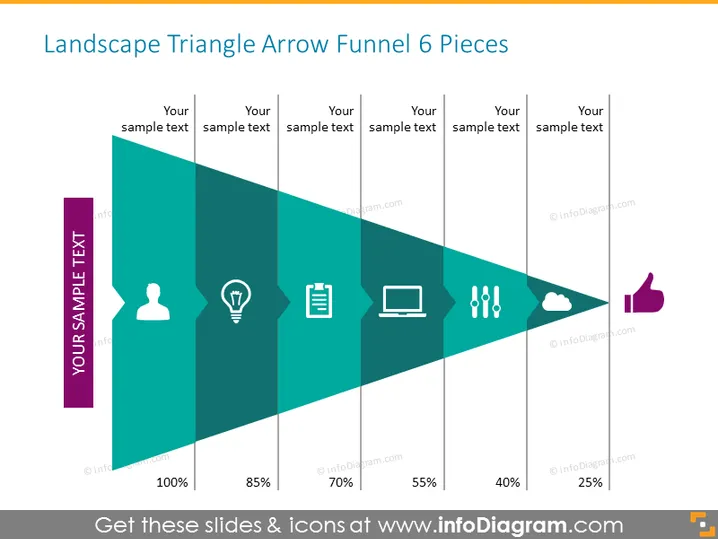
Landscape Triangle Arrow Funnel 6 Pieces
Slide Content
The slide presents a conceptual landscape triangle arrow funnel with six segments, each accompanied by a different icon and placeholder for sample text, indicating a step-by-step reduction or filtering process. The percentages reducing from 100% to 25% suggest a quantitative measure of progression through stages or rates of conversion, with each step potentially representing a phase in a process such as sales, engagement, or selection. Each of the icons can represent a different aspect or consideration at each stage of the funnel process.
Graphical Look
- A large, rightward-pointing triangle, segmented into six decreasing-width sections, creates a funnel shape.
- Each section contains a unique icon: a user, a light bulb, a clipboard, a laptop, exclamation marks, and a cloud.
- The first section starts with 100%, and each subsequent segment decrements in percentages: 85%, 70%, 55%, 40%, 25%.
- A vertical thumbs-up icon is placed adjacent to the last segment.
- To the left of the triangle, there is a vertical banner with rotated text labeled "YOUR SAMPLE TEXT".
- Each section’s division has an accompanying text box aligned horizontally above the triangle, labeled "Your sample text".
The design uses a teal gradient, giving the graphic depth and a sense of progression. White icons and text contrast sharply against this background, making the information easy to read.
Use Cases
- Illustrating the stages of a sales funnel in a business presentation.
- Representing applicant filtering in a recruitment process.
- Depicting customer journey stages from awareness to purchase.
- Displaying data or process flow in educational materials or training sessions.
How to Edit
How to edit text & colors

How to expand / shorten diagram

How to Replace Icons in infoDiagram PPT


