

Your graphics add a nice touch to my presentations and I recently used them for one of my all-hands meetings. Your toolbox adds professionalism to my slides. Instead of using standard clipart.
Claude Jones, Director of Engineer, @Walmartlabs, USA

Your graphics add a nice touch to my presentations and I recently used them for one of my all-hands meetings. Your toolbox adds professionalism to my slides. Instead of using standard clipart.
Claude Jones, Director of Engineer, @Walmartlabs, USA
I needed a fresh look at some of my slides. I've tried to find a way to create a paintbrush effect, to underline, accentuate, add some color and the handwritten markers were just the things. Very easy to use, easy to size, change the color. It was an affordable, perfect solution and I'm happy to recommend it.
Anonymous, US
The crisp, clean look of the graphics, and the fact that it allowed me to easily edit and change the colors to match the template was my main reason for purchasing them.
Brandie Jenkins, E-learning Developer, USA
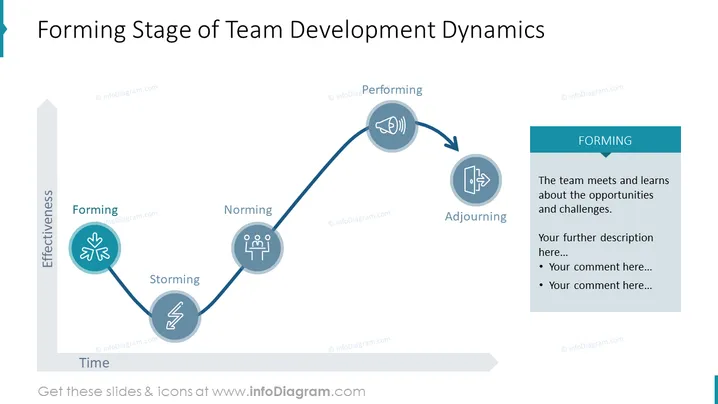
The slide presents the 'Forming Stage of Team Development Dynamics' based upon Tuckman's model of group development. This concept illustrates that a team progresses through various stages—Forming, Storming, Norming, Performing, and Adjourning. Forming represents the initial stage where the team meets and learns about the opportunities and challenges they will face. Storming is characterized by conflict and competition as team members start to assert their personalities. During the Norming phase, rules and structure are established, leading to unity. In Performing, the team finally functions effectively and focuses on achieving goals. Adjourning, sometimes also called Mourning, marks the dissolution of the team after the project's completion.
The slide has a clean and professional aesthetic with blue and gray color tones. Icons and text are used effectively to convey the developmental path of a team.



