

Your graphics add a nice touch to my presentations and I recently used them for one of my all-hands meetings. Your toolbox adds professionalism to my slides. Instead of using standard clipart.
Claude Jones, Director of Engineer, @Walmartlabs, USA

Your graphics add a nice touch to my presentations and I recently used them for one of my all-hands meetings. Your toolbox adds professionalism to my slides. Instead of using standard clipart.
Claude Jones, Director of Engineer, @Walmartlabs, USA
I needed a fresh look at some of my slides. I've tried to find a way to create a paintbrush effect, to underline, accentuate, add some color and the handwritten markers were just the things. Very easy to use, easy to size, change the color. It was an affordable, perfect solution and I'm happy to recommend it.
Anonymous, US
The crisp, clean look of the graphics, and the fact that it allowed me to easily edit and change the colors to match the template was my main reason for purchasing them.
Brandie Jenkins, E-learning Developer, USA
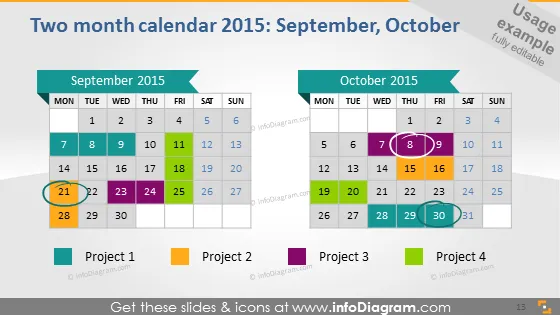
The slide presents a two-month calendar for September and October 2015, highlighting various days and project milestones. Dates are marked with colored shapes to delineate specific projects or events. Project 1 and Project 3 have single dates highlighted, while Project 2 has a range, and Project 4 multiple individual days. This visualization of the calendar helps in understanding the timeline and duration of each project or event, providing a quick overview of a two-month plan.
The slide uses a combination of rectangles and color-coding to organize and display information in a clear and visually appealing manner. The palette is bright and varied, aiding in distinguishing between the different projects.



