
Reviews
Ihre Grafiken verleihen meinen Präsentationen eine nette Note, und ich habe sie kürzlich für eines meiner All-Hands-Meetings verwendet. Ihre Toolbox verleiht meinen Folien Professionalität, anstatt Standard-Clipart zu verwenden.
Ich brauchte einen neuen Blick auf einige meiner Folien. Ich habe versucht, einen Weg zu finden, einen Pinselschlag-Effekt zu erzielen, um zu unterstreichen, hervorzuheben, Farbe hinzuzufügen, und die handgeschriebenen Markierungen waren genau das Richtige. Sehr einfach zu bedienen, leicht in der Größe zu ändern, die Farbe zu ändern. Es war eine erschwingliche, perfekte Lösung und ich empfehle sie gerne weiter.
Die klare, saubere Optik der Grafiken und die Tatsache, dass ich die Farben leicht bearbeiten und an die Vorlage anpassen konnte, war mein Hauptgrund für den Kauf.
Description
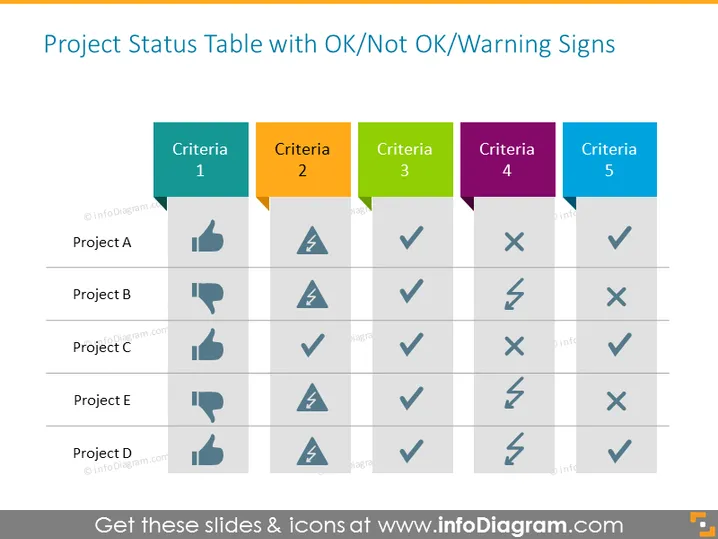
Project Status Table with OK/Not OK/Warning Signs
Slide Content
The slide presents a project status table which uses icons to indicate various criteria statuses across five projects. "Criteria 1" to "Criteria 5" are marked across the top, using different colors for each criterion for easy differentiation. Projects A to E are listed on the left side. The status of each project under each criterion is represented by three possible icons: a thumbs up for "OK," a warning triangle for "Not OK," and a check mark within a circle for a warning or intermediate status. This provides at a glance an assessment of multiple projects against a set of performance or status criteria.
Graphical Look
- The slide has a clear, structured layout with a title at the top.
- Five colored rectangles represent the column headers for "Criteria 1" to "Criteria 5" with each criteria header having a distinct color.
- Rows labeled "Project A" through "Project E" run down the left side, slightly indented and in bold.
- Status icons are placed in the corresponding cells for each project-criteria intersection.
- Thumbs up icon: suggests agreement or satisfaction.
- Warning triangle icon: indicates caution or an issue.
- A check mark within a circle: implies a note of consideration or a warning.
The slide has a balanced mix of text and graphical elements, with the background kept in a light color to ensure readability and focus on the content.
The overall look of the slide is professional and organized, with an intuitive layout that allows for quick visual interpretation of project status. The design elements are simple and self-explanatory, which helps to convey complex information efficiently.
Use Cases
- In project management meetings to report status updates and progress of multiple projects.
- During executive briefings to quickly inform stakeholders about the health of various initiatives or deliverables.
- In team meetings to prioritize issues and discuss the statuses of project components that require attention.
- As part of internal communications for comparing performance metrics or compliance across different company departments or teams.
How to Edit
How to edit text & colors

How to expand / shorten diagram

How to Replace Icons in infoDiagram PPT


