
Reviews
Sus gráficos añaden un toque agradable a mis presentaciones y recientemente los usé para una de mis reuniones generales. Su conjunto de herramientas añade profesionalismo a mis diapositivas. En lugar de usar imágenes prediseñadas estándar.
Necesitaba un aspecto fresco para algunas de mis diapositivas. Había intentado encontrar una forma de crear un efecto de pincel, de subrayar, acentuar, añadir algo de color y los marcadores escritos a mano fueron justo lo que necesitaba. Muy fácil de usar, fácil de ajustar el tamaño, cambiar el color. Fue una solución asequible y perfecta, y estoy feliz de recomendarla.
El aspecto nítido y limpio de los gráficos, y el hecho de que me permitiera editar y cambiar fácilmente los colores para que coincidieran con la plantilla fue mi principal razón para comprarlos.
Description
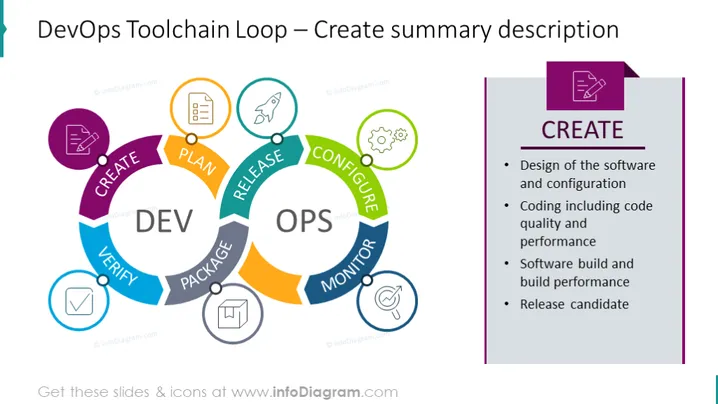
DevOps Toolchain Loop – Create summary description
Slide Content
The slide presents an overview of the 'Create' phase within the DevOps Toolchain Loop. It emphasizes four key components: designs of software and configuration, which refers to the initial conceptualization and setup; coding, including code quality and performance, relating to writing and optimizing the software; software build and build performance, which is the process of compiling code into executable programs; and the release candidate, which is the nearly final version of the software prepared for release.
Graphical Look
- The slide features a large circular diagram in the center, divided into two main sections labeled "DEV" and "OPS," indicating the development and operations aspects of DevOps.
- Within the circle, multiple colored segments are connected like a loop, with each segment labeled with a different phase of DevOps such as "CREATE," "VERIFY," "PACKAGE," "RELEASE," "CONFIGURE," "MONITOR," and "PLAN."
- Each phase is associated with an icon, positioned above the colored segment, representing the respective step in the process.
- On the right side, there is a vertical purple bar with a white text box detailing the 'CREATE' phase, listing its components and activities in bullet points.
- A stylized corner ribbon in purple holds an icon of a document, symbolizing the creation or documentation aspect of the phase.
- The overall visual theme includes a balance of cool-toned colors with purple as a highlight.
The slide has a clean and professional design with a clear visual representation of the DevOps loop. The use of color coding and icons helps differentiate the phases and makes the information digestible.
Use Cases
- Illustrating the DevOps lifecycle during a technical team meeting to align on the processes and steps.
- Training new employees or clients on the structure of the DevOps methodology and the importance of each stage.
- As part of a proposal to stakeholders or management to adopt DevOps practices within an organization.
- Discussing continuous improvement strategies in software development and operations with a focus on the 'Create' phase.
How to Edit
How to edit text & colors

How to expand / shorten diagram

How to Replace Icons in infoDiagram PPT


