

Your graphics add a nice touch to my presentations and I recently used them for one of my all-hands meetings. Your toolbox adds professionalism to my slides. Instead of using standard clipart.
Claude Jones, Director of Engineer, @Walmartlabs, USA

Your graphics add a nice touch to my presentations and I recently used them for one of my all-hands meetings. Your toolbox adds professionalism to my slides. Instead of using standard clipart.
Claude Jones, Director of Engineer, @Walmartlabs, USA
I needed a fresh look at some of my slides. I've tried to find a way to create a paintbrush effect, to underline, accentuate, add some color and the handwritten markers were just the things. Very easy to use, easy to size, change the color. It was an affordable, perfect solution and I'm happy to recommend it.
Anonymous, US
The crisp, clean look of the graphics, and the fact that it allowed me to easily edit and change the colors to match the template was my main reason for purchasing them.
Brandie Jenkins, E-learning Developer, USA
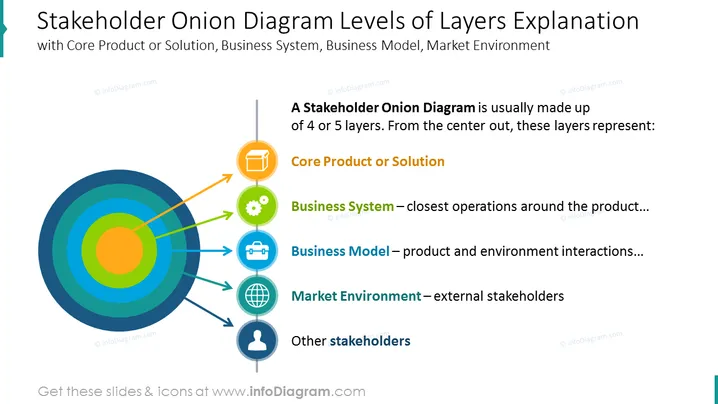
##Slide content: This slide shows a stakeholder onion diagram visuals with layers of explanation. The core layer, as the name insinuates, shows the core product or solution. The next layer defines the business system, such as the closest operations around the core product/solution. Then we have the business model layer, symbolizing product and environment, and interactions. And next comes the market environment as external stakeholders, and the last outer layer shows the other stakeholders involved. All the graphics are editable, so you can write your description and add your own comments. The presentation is compatible with Google Slides and Keynote too. Click on the picture to see the whole Stakeholder Analysis PowerPoint Template.
##Slide infographic description: Onion Diagram, 3D Box Icon, Gear Icon, Suitcase Outline Icon, Globe Icon, Man Icon, Arrow Vectors



