
Reviews
Ihre Grafiken verleihen meinen Präsentationen eine nette Note, und ich habe sie kürzlich für eines meiner All-Hands-Meetings verwendet. Ihre Toolbox verleiht meinen Folien Professionalität, anstatt Standard-Clipart zu verwenden.
Ich brauchte einen neuen Blick auf einige meiner Folien. Ich habe versucht, einen Weg zu finden, einen Pinselschlag-Effekt zu erzielen, um zu unterstreichen, hervorzuheben, Farbe hinzuzufügen, und die handgeschriebenen Markierungen waren genau das Richtige. Sehr einfach zu bedienen, leicht in der Größe zu ändern, die Farbe zu ändern. Es war eine erschwingliche, perfekte Lösung und ich empfehle sie gerne weiter.
Die klare, saubere Optik der Grafiken und die Tatsache, dass ich die Farben leicht bearbeiten und an die Vorlage anpassen konnte, war mein Hauptgrund für den Kauf.
Description
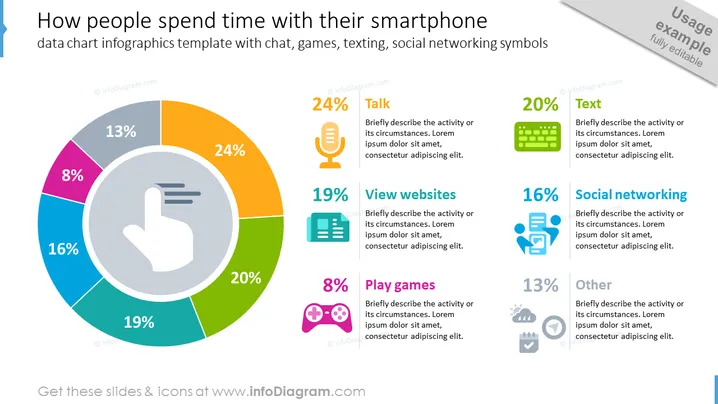
How People Spend Time with Their Smartphones Slide slide content
How People Spend Time with Their Smartphones Slide can be used when you want to understand user behavior and optimize the user experience. For example, you can use this PPT slide in marketing research presentations to understand how your target audience engages with their smartphones and which activities are most popular. This information can guide marketing strategies and customer segmentation. The data chart is presented in a modern and colorful design, capturing the attention of the audience. We have added space for you to write a brief description next to each activity, and you can illustrate your ideas with creative icons. All shapes are vectors, so you can change the colors and resize the element according to your preference without losing quality. You can download this PPT template on Google Slides and Keynote.
How People Spend Time with Their Smartphones Slide slide infographics
White Background, Text Box, Colorful Data Chart, Touch Control Icon, Touchscreen Icon, Voice Icon, Microphone Icon, News Icon, Newspaper Icon, Video Game Icon, Game Console Icon, Gamepad Icon, Computer Keyboard Icon, Social Media Icon, Weather Forecast Icon, Calendar Icon, Navigation Icon, Route Planning Icon, Compass Icon
How to Edit
How to edit text & colors

How to expand / shorten diagram

How to Replace Icons in infoDiagram PPT


