
Reviews
Ihre Grafiken verleihen meinen Präsentationen eine nette Note, und ich habe sie kürzlich für eines meiner All-Hands-Meetings verwendet. Ihre Toolbox verleiht meinen Folien Professionalität, anstatt Standard-Clipart zu verwenden.
Ich brauchte einen neuen Blick auf einige meiner Folien. Ich habe versucht, einen Weg zu finden, einen Pinselschlag-Effekt zu erzielen, um zu unterstreichen, hervorzuheben, Farbe hinzuzufügen, und die handgeschriebenen Markierungen waren genau das Richtige. Sehr einfach zu bedienen, leicht in der Größe zu ändern, die Farbe zu ändern. Es war eine erschwingliche, perfekte Lösung und ich empfehle sie gerne weiter.
Die klare, saubere Optik der Grafiken und die Tatsache, dass ich die Farben leicht bearbeiten und an die Vorlage anpassen konnte, war mein Hauptgrund für den Kauf.
Description
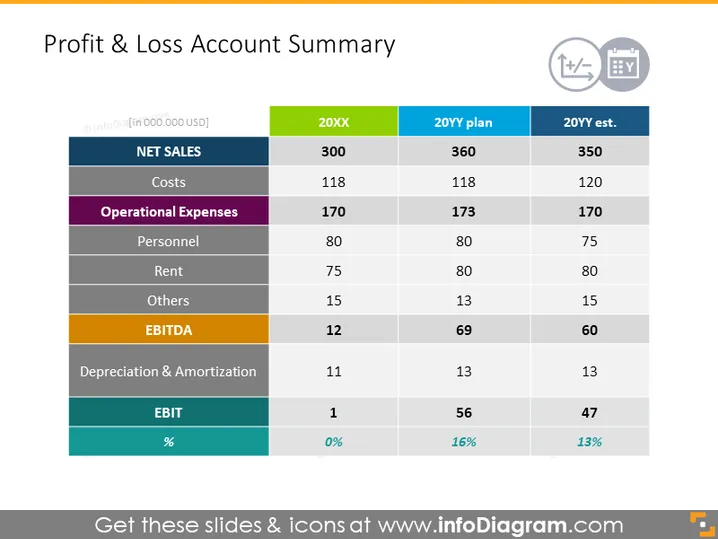
Profit & Loss Account Summary
Slide Content
The slide depicts a Profit & Loss (P&L) Account Summary which contrasts the figures across three time periods: historical (20XX), a plan (20YY plan), and an estimate for a future year (20YY est.). The summary includes net sales, costs, operational expenses further broken down by personnel, rent, and others, followed by EBITDA, depreciation & amortization, and finally EBIT, with corresponding percentages at the bottom highlighting how much profit is earned after all expenses (EBIT percentage).
Graphical Look
- The slide has a title at the top in large, bold font.
- At the top right corner, there are three icons suggestive of operations: increase/decrease, settings, and presentation mode.
- The main content is organized into a table with columns labeled "20XX," "20YY plan," and "20YY est."
- The rows of the table are color-coded, indicating different categories such as net sales, costs, operational expenses, etc.
- Each row label has a background color that corresponds to its category.
- Some numbers are bold, drawing attention to important figures like EBIT percentages.
- The table has grid lines to separate and organize the data visually.
The slide presents a clean, straightforward design that allows for easy comparison of financial data over different time periods and plan statuses. The use of color highlights different sections of the P&L statement, making it visually appealing and easier to read.
Use Cases
- Presenting a company's financial performance overview to stakeholders or during board meetings.
- Comparing actual sales and expenses against previous plans during a strategic review session.
- Illustrating financial results in investor briefings and annual reports.
- Offering a snapshot of profitability metrics in financial planning and analysis presentations.
How to Edit
How to edit text & colors

How to expand / shorten diagram

How to Replace Icons in infoDiagram PPT


