
Reviews
Ihre Grafiken verleihen meinen Präsentationen eine nette Note, und ich habe sie kürzlich für eines meiner All-Hands-Meetings verwendet. Ihre Toolbox verleiht meinen Folien Professionalität, anstatt Standard-Clipart zu verwenden.
Ich brauchte einen neuen Blick auf einige meiner Folien. Ich habe versucht, einen Weg zu finden, einen Pinselschlag-Effekt zu erzielen, um zu unterstreichen, hervorzuheben, Farbe hinzuzufügen, und die handgeschriebenen Markierungen waren genau das Richtige. Sehr einfach zu bedienen, leicht in der Größe zu ändern, die Farbe zu ändern. Es war eine erschwingliche, perfekte Lösung und ich empfehle sie gerne weiter.
Die klare, saubere Optik der Grafiken und die Tatsache, dass ich die Farben leicht bearbeiten und an die Vorlage anpassen konnte, war mein Hauptgrund für den Kauf.
Description
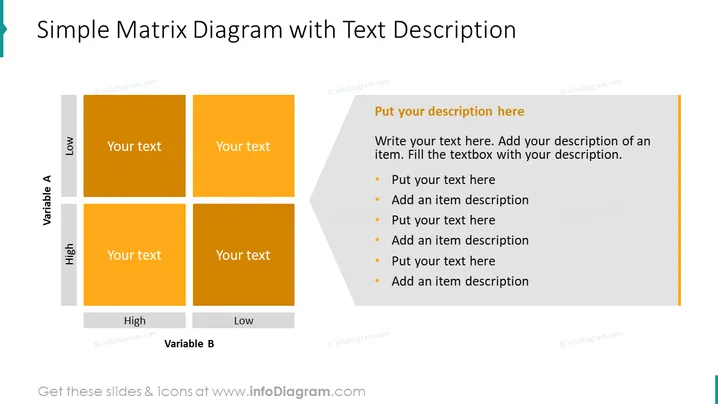
Simple Matrix Diagram with Text Description
Slide Content
The slide presents a Simple Matrix Diagram used to analyze relationships between two variables, labeled as Variable A and Variable B, each with a dichotomy of high and low. The matrix is divided into four quadrants, indicating different combinations of these variables (e.g., high Variable A with low Variable B, etc.), with placeholders for text in each quadrant to describe specific scenarios or characteristics. There's an additional section to the right for a detailed description, which includes bullet points to expand upon the items listed within the matrix.
Graphical Look
- The slide features a large title at the top in bold, black font.
- A two-by-two matrix occupies the left side, with headers indicating 'High' and 'Low' for each variable along the corresponding axis.
- Each quadrant of the matrix is colored in shades of orange, with text placeholders labeled "Your text."
- A sidebar on the right contains a semi-transparent gray overlay for detailed textual content, with bullet points introduced by small orange squares.
- The font color within the matrix and sidebar contrasts as white against the darker background for readability.
The slide has a clean, modern look with a color scheme based around orange shades that stand out against a light background. The simplistic design favors clarity and focus on the content.
Use Cases
- To analyze and present SWOT (Strengths, Weaknesses, Opportunities, Threats) in business strategy sessions.
- For comparing product features against competitor offerings in a marketing presentation.
- When discussing risk assessment where factors are categorized by their probability and impact.
- In project management, to prioritize tasks or issues based on urgency and importance.
How to Edit
How to edit text & colors

How to expand / shorten diagram

How to Replace Icons in infoDiagram PPT


