
Reviews
Sus gráficos añaden un toque agradable a mis presentaciones y recientemente los usé para una de mis reuniones generales. Su conjunto de herramientas añade profesionalismo a mis diapositivas. En lugar de usar imágenes prediseñadas estándar.
Necesitaba un aspecto fresco para algunas de mis diapositivas. Había intentado encontrar una forma de crear un efecto de pincel, de subrayar, acentuar, añadir algo de color y los marcadores escritos a mano fueron justo lo que necesitaba. Muy fácil de usar, fácil de ajustar el tamaño, cambiar el color. Fue una solución asequible y perfecta, y estoy feliz de recomendarla.
El aspecto nítido y limpio de los gráficos, y el hecho de que me permitiera editar y cambiar fácilmente los colores para que coincidieran con la plantilla fue mi principal razón para comprarlos.
Description
KEY SERVICES REVENUE
Slide Content
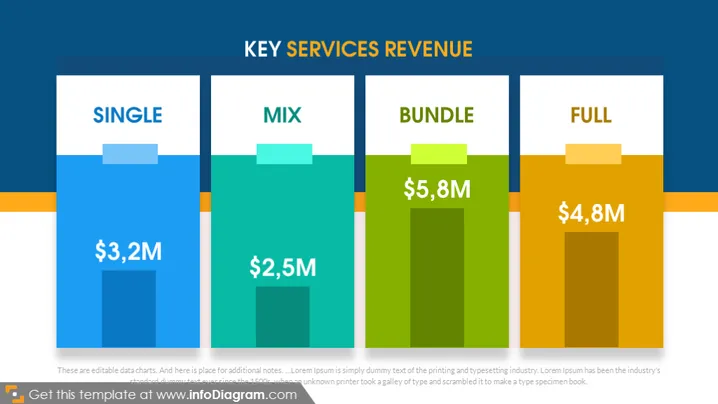
The slide titled "KEY SERVICES REVENUE" breaks down revenue into four categories: SINGLE, MIX, BUNDLE, and FULL. Each category has a corresponding financial figure, represented by blue, green, and orange bars respectively. "SINGLE" generated $3.2M, indicating the revenue from a single service or product. "MIX" refers to a combination of services with $2.5M in revenue. "BUNDLE" produced $5.8M, likely from a package of services or products. "FULL" includes perhaps a full suite of services or products, showing a revenue of $4.8M.
Graphical Look
- The slide background is dark navy blue, with a horizontal orange accent line.
- Four vertical bar graphics represent different categories, with the tallest in the center.
- Each bar has a lighter shade top section with a title: blue for "SINGLE", green for "MIX", green for "BUNDLE", and orange for "FULL".
- Revenue figures are prominently displayed on each bar in white font.
- Each category title is in uppercase white letters, within a darker rectangle at the bar top.
- There's a subtle drop shadow behind each bar, adding depth to the graphics.
The visual composition is balanced and clean, utilizing a dark background to emphasize the colorful bar graphics. The bars are of varying heights, directly representing the revenue amounts, which allows for quick visual comparison.
Use Cases
- Presenting company financials during an annual general meeting or investor presentation.
- Analyzing product or service line performance in a management or team meeting.
- Showcasing revenue data in a sales strategy or business development meeting.
- Comparing revenue streams in a dashboard report or financial review.
How to Edit
How to edit text & colors

How to expand / shorten diagram

How to Replace Icons in infoDiagram PPT


