
Reviews
Your graphics add a nice touch to my presentations and I recently used them for one of my all-hands meetings. Your toolbox adds professionalism to my slides. Instead of using standard clipart.
I needed a fresh look at some of my slides. I've tried to find a way to create a paintbrush effect, to underline, accentuate, add some color and the handwritten markers were just the things. Very easy to use, easy to size, change the color. It was an affordable, perfect solution and I'm happy to recommend it.
The crisp, clean look of the graphics, and the fact that it allowed me to easily edit and change the colors to match the template was my main reason for purchasing them.
Description
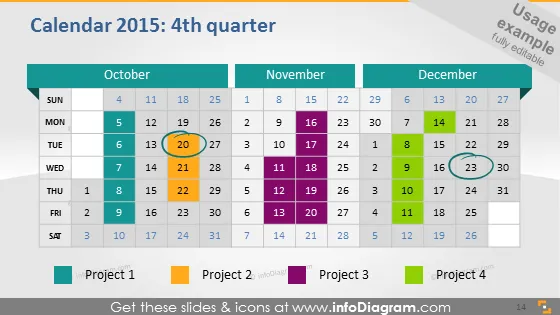
Calendar 2015: 4th quarter
Slide Content
The slide presents a calendar for the fourth quarter of 2015, with October, November, and December laid out in a grid format showcasing weeks and days. Four distinct projects are color-coded at the bottom and corresponding color blocks are used on specific days across the calendar to indicate the duration and timeline of each project's activities. The days marked for Project 1 suggest continuous activity while Projects 2, 3, and 4 appear to have selective engagement over the quarter, depicting the ability to visualize and plan project timelines over a three-month period.
Graphical Look
- Three distinct horizontal blocks representing the months: October, November, and December, each with a different shade of blue.
- Days of the week are labeled at the top of each monthly block, with Sundays highlighted in a slightly darker shade.
- Dates are presented in rows beneath the days of the week for each month, with a white font on a transparent background.
- Colored rectangular blocks correspond to 'Project 1', 'Project 2', 'Project 3', and 'Project 4', and similar colored stripes overlay specific dates, signifying project timelines.
- Each project's label at the bottom has a matching color square followed by the project name.
- The slide has a gradient gray background blending into white at the bottom.
The slide possesses a clean, professional look with a practical use of color-coding to differentiate between projects. The design is direct and functional, allowing for at-a-glance understanding of project timelines across the months displayed.
Use Cases
- To present a quarter's project timelines in a company's internal meetings.
- For project managers to show progress and forecasts during client presentations.
- For strategic planning sessions, allowing stakeholders to visualize the allocation of resources over time.
- In educational settings when teaching project management or time management concepts.
How to Edit
How to edit text & colors

How to expand / shorten diagram

How to Replace Icons in infoDiagram PPT


