

Your graphics add a nice touch to my presentations and I recently used them for one of my all-hands meetings. Your toolbox adds professionalism to my slides. Instead of using standard clipart.
Claude Jones, Director of Engineer, @Walmartlabs, USA

Your graphics add a nice touch to my presentations and I recently used them for one of my all-hands meetings. Your toolbox adds professionalism to my slides. Instead of using standard clipart.
Claude Jones, Director of Engineer, @Walmartlabs, USA
I needed a fresh look at some of my slides. I've tried to find a way to create a paintbrush effect, to underline, accentuate, add some color and the handwritten markers were just the things. Very easy to use, easy to size, change the color. It was an affordable, perfect solution and I'm happy to recommend it.
Anonymous, US
The crisp, clean look of the graphics, and the fact that it allowed me to easily edit and change the colors to match the template was my main reason for purchasing them.
Brandie Jenkins, E-learning Developer, USA
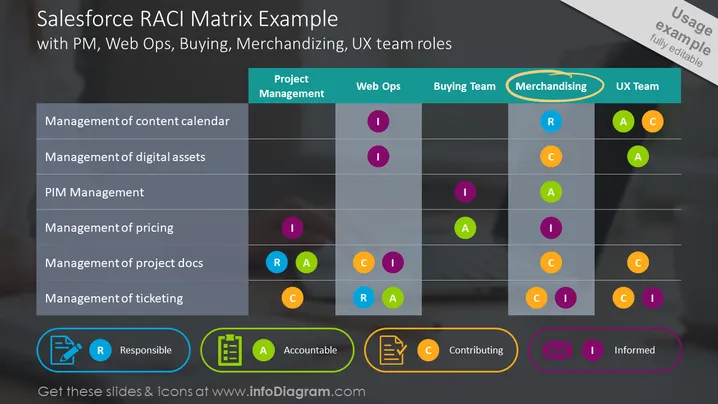
The slide shows a RACI matrix designed for a Salesforce project, detailing various tasks like content calendar management and digital asset management, and the roles associated with them. Specific roles include Project Management, Web Ops, Buying Team, Merchandising, and UX Team, each with its designated RACI letters (Responsible, Accountable, Consulted, Informed) in corresponding cells, signifying their level of involvement in each task.
The overall look of the slide is modern and professional, with a clear emphasis on categorization through the use of color-coded circles and icons to visually separate tasks and responsibilities.
This slide is typically used in business presentations for project kickoff meetings, team briefings, or workshops focused on assigning and clarifying team roles and responsibilities within a Salesforce project. It helps ensure that everyone understands their specific functions and how they contribute to the project's overall workflow.



