
Reviews
Ihre Grafiken verleihen meinen Präsentationen eine nette Note, und ich habe sie kürzlich für eines meiner All-Hands-Meetings verwendet. Ihre Toolbox verleiht meinen Folien Professionalität, anstatt Standard-Clipart zu verwenden.
Ich brauchte einen neuen Blick auf einige meiner Folien. Ich habe versucht, einen Weg zu finden, einen Pinselschlag-Effekt zu erzielen, um zu unterstreichen, hervorzuheben, Farbe hinzuzufügen, und die handgeschriebenen Markierungen waren genau das Richtige. Sehr einfach zu bedienen, leicht in der Größe zu ändern, die Farbe zu ändern. Es war eine erschwingliche, perfekte Lösung und ich empfehle sie gerne weiter.
Die klare, saubere Optik der Grafiken und die Tatsache, dass ich die Farben leicht bearbeiten und an die Vorlage anpassen konnte, war mein Hauptgrund für den Kauf.
Description
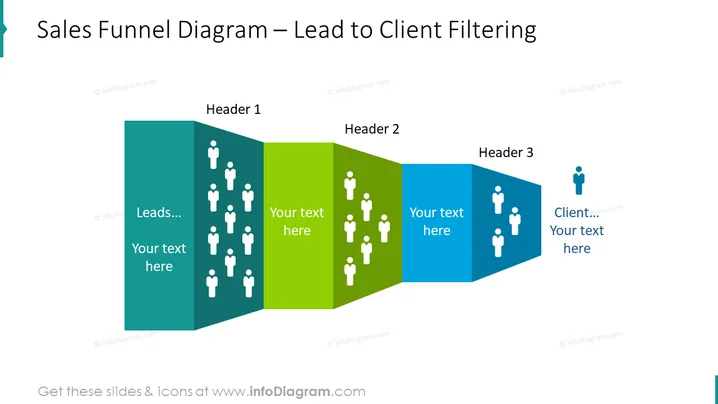
Sales Funnel Diagram – Lead to Client Filtering
Slide Content
The slide illustrates the stages of a sales funnel, labeled as "Leads," "Header 1," "Header 2," and "Client." Each stage has a corresponding color and a number of icons representing individuals. "Leads" are shown in the largest section with the most icons, signifying a broad initial group. As the funnel narrows, the sections decrease in size and icon count, symbolizing the filtering process in converting leads to actual clients. Text placeholders suggest customizability for descriptive content.
Graphical Look
- The slide background is white.
- A large title is positioned at the top left in bold, dark text.
- There are four sections forming an angled funnel shape.
- Each section is a different color: teal, green, light blue, and dark blue, progressing from left to right.
- The sections decrease in width from left to right, representing the narrowing of a sales funnel.
- Within each section, there are white human-shaped icons.
- The number of icons decreases from left (many icons) to right (fewest icons).
- The icons are organized in a grid pattern within each section.
- Text placeholders labeled "Your text here" are positioned in each section beneath the headers, allowing for customization.
- Each section has a heading labeled "Header 1", "Header 2", and "Client."
The slide has a clean, professional look with a color gradation that visually guides the viewer through the sales process. The human-shaped icons effectively represent the concept of leads transforming into clients throughout the sales funnel.
Use Cases
- Presenting the sales process stages to a team or during a training session.
- Analyzing the efficiency of lead conversion during a business review meeting.
- Setting targets for different stages of customer acquisition in a marketing strategy presentation.
- Demonstrating the lead-to-client transition in a sales pitch to potential investors or stakeholders to emphasize the company's conversion strategy and potential for growth.
How to Edit
How to edit text & colors

How to expand / shorten diagram

How to Replace Icons in infoDiagram PPT


