
Reviews
Vos graphiques ajoutent une belle touche à mes présentations et je les ai récemment utilisés pour l'une de mes réunions générales. Votre boîte à outils ajoute du professionnalisme à mes diapositives. Au lieu d'utiliser des cliparts standards.
J'avais besoin d'un nouveau regard sur certaines de mes diapositives. J'ai essayé de trouver un moyen de créer un effet de pinceau, de souligner, d'accentuer, d'ajouter de la couleur et les marqueurs manuscrits étaient exactement ce qu'il fallait. Très facile à utiliser, facile à ajuster la taille, à changer la couleur. C'était une solution abordable et parfaite et je suis heureux de la recommander.
L'aspect net et épuré des graphiques, et le fait qu'il m'ait permis d'éditer et de changer facilement les couleurs pour les adapter au modèle, ont été les principales raisons de mon achat.
Description
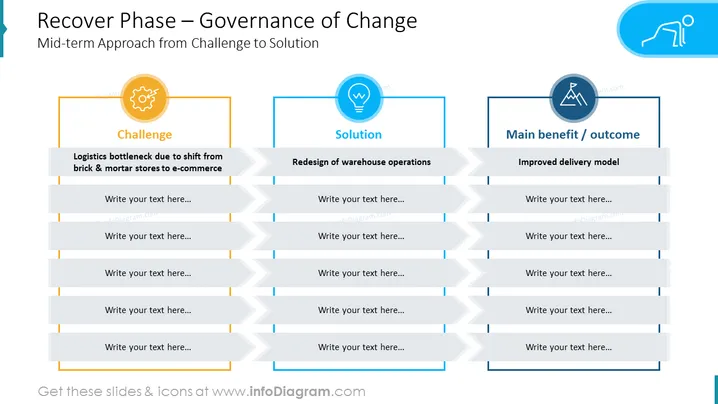
Recover Phase – Governance of Change
Slide Content
The PowerPoint slide is titled "Recover Phase – Governance of Change" and outlines a mid-term approach strategy from identifying a challenge to finding a solution and presenting the main benefit or outcome. The spread is divided into three sections: "Challenge," "Solution," and "Main benefit / outcome". The challenge mentioned is a "Logistics bottleneck due to shift from brick & mortar stores to e-commerce." The solution is "Redesign of warehouse operations." The main benefit or outcome is "Improved delivery model." Each section has space for additional text and explanations.
Graphical Look
- A title block in blue with white text spans the top of the slide.
- Three main content blocks are visually distinguished with different icons and header backgrounds: yellow for "Challenge," light blue for "Solution," and dark blue for "Main benefit / outcome."
- Icons representing gear (Challenge), light bulb (Solution), and person running uphill (Main benefit / outcome) are enclosed in colored circles matching the section colors.
- The blocks have pre-structured points with lines for entering text, creating a clear, organized layout.
- Each section has a main header with a short description underneath.
- Horizontal arrows connect the content blocks, suggesting a workflow or process.
The slide uses a clean, professional design with a minimalistic approach. The iconography enhances the visual distinction between the sections, contributing to the overall clarity of the slide.
Use Cases
- To present a business problem-solving strategy during management meetings.
- For change management presentations detailing phases of transition and required actions.
- In project kickoff presentations to outline critical issues and propose solutions.
- As part of a pitch to stakeholders to demonstrate a clear plan for addressing operational challenges.
How to Edit
How to edit text & colors

How to expand / shorten diagram

How to Replace Icons in infoDiagram PPT


