
Reviews
Your slides are my "secret sauce" when it comes to presenting my ideas to clients. I save a lot of time.
J'avais un délai de livraison à respecter et je n'avais pas le temps de créer une variété de modèles de diapositives. Infodiagram m'a proposé des options faciles à télécharger et à personnaliser en fonction de mes besoins !
Vos diapositives suscitent souvent de précieux commentaires et idées de la part de mon équipe, ce qui améliore les diapositives finales.
Description
RASCI Matrix Table
Slide Content
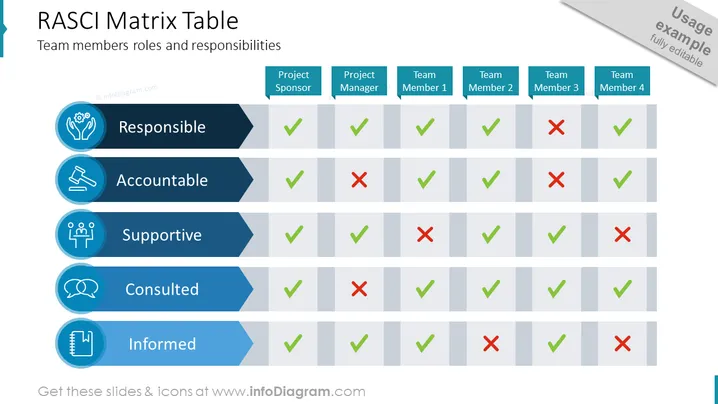
The slide is titled "RASCI Matrix Table" and includes the subtitle "Team members roles and responsibilities." It presents a matrix with roles such as Responsible, Accountable, Supportive, Consulted, and Informed, aligned with various team positions - Project Sponsor, Project Manager, and Team Members 1 through 4. Checkmarks (✓) and crosses (✗) indicate whether a role applies to each team position. "Responsible" means owning the task completion, "Accountable" indicates ultimate accountability, "Supportive" implies providing support, "Consulted" involves being asked for input, and "Informed" means being kept up-to-date.
Graphical Look
- A blue header banner with the slide title in white font.
- Five horizontal rows beneath, each representing a RASCI role, starting with ‘Responsible’ and ending with ‘Informed.’
- Each row has an accompanying icon on the left, symbolizing the role, such as hands for ‘Responsible’ or a speaking head for ‘Consulted.’
- Dark and light shades of blue are used alternately for row backgrounds, aiding visual distinction.
- Columns with team positions labeled in white over a lighter blue background.
- Checkmarks (in green) and crosses (in red) inside the table indicate the role each team member has.
The slide is designed with a clean and professional look, using a color palette of blue, green, and red to denote different roles and statuses. Icons add a visual element to quickly convey the concept of each role.
Use Cases
- To clarify team roles and responsibilities in project kickoff meetings.
- During team alignment sessions to ensure everyone understands their part in a project.
- In management presentations to communicate team structure and workflow.
- For addressing issues of accountability and responsibility in project reviews or audits.
How to Edit
How to edit text & colors

How to expand / shorten diagram

How to Replace Icons in infoDiagram PPT


