
Reviews
Your graphics add a nice touch to my presentations and I recently used them for one of my all-hands meetings. Your toolbox adds professionalism to my slides. Instead of using standard clipart.
I needed a fresh look at some of my slides. I've tried to find a way to create a paintbrush effect, to underline, accentuate, add some color and the handwritten markers were just the things. Very easy to use, easy to size, change the color. It was an affordable, perfect solution and I'm happy to recommend it.
The crisp, clean look of the graphics, and the fact that it allowed me to easily edit and change the colors to match the template was my main reason for purchasing them.
Description
Purchasing statistics
Slide Content
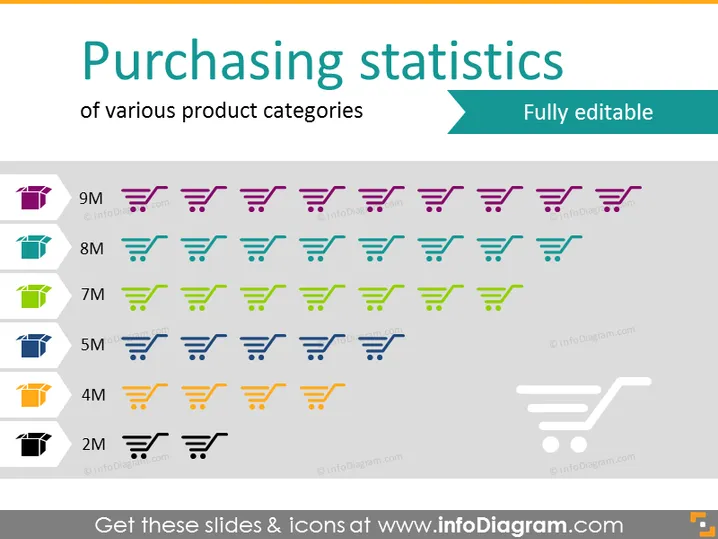
The slide titled "Purchasing statistics" visualizes data for different product categories, using a unique approach by representing each million in sales with a cart icon. Colors differentiate product categories, and the scale on the left measures the sales from 2 million to 9 million. Each column of shopping carts corresponds to a distinct category, with the number of carts stacked vertically equating with the sales volume for that category, illustrating the relative performance of each.
Graphical Look
- The slide background is white, providing a clean and neutral canvas for the content.
- A teal header with the title "Purchasing statistics" in large, bold white text, followed by a subtitle "of various product categories" in a smaller font.
- A teal-colored ribbon-like shape extends from the right side of the title area with "Fully editable" in white text.
- On the left, a vertical scale with numerical values ranging from 2M to 9M in dark gray represents the sales in millions.
- Multiple rows of stylized shopping cart icons, with each row representing a different product category and each cart representing one million in sales.
- Each category is color-coded with a leading color-block with white text showing the sales amount (e.g., 9M) on the left side of the respective row.
- The shopping cart icons fill up the slide horizontally, with a decrease in saturation for cart icons that represent partial millions.
The slide has a very organized and quantitative visual layout using icons to create an infographic-like representation of sales data. The use of color-coding assists in quick differentiation between categories.
Use Cases
- Presenting sales data in a retail or e-commerce business meeting to highlight the performance of varying product categories.
- Using in a marketing presentation to illustrate the success of different product campaigns or promotions.
- Incorporating into annual reports to provide a visual breakdown of revenue streams by product category.
- Showing in an investor pitch to demonstrate market penetration and sales volume for a portfolio of products.
How to Edit
How to edit text & colors

How to expand / shorten diagram

How to Replace Icons in infoDiagram PPT


