
Reviews
Sus gráficos añaden un toque agradable a mis presentaciones y recientemente los usé para una de mis reuniones generales. Su conjunto de herramientas añade profesionalismo a mis diapositivas. En lugar de usar imágenes prediseñadas estándar.
Necesitaba un aspecto fresco para algunas de mis diapositivas. Había intentado encontrar una forma de crear un efecto de pincel, de subrayar, acentuar, añadir algo de color y los marcadores escritos a mano fueron justo lo que necesitaba. Muy fácil de usar, fácil de ajustar el tamaño, cambiar el color. Fue una solución asequible y perfecta, y estoy feliz de recomendarla.
El aspecto nítido y limpio de los gráficos, y el hecho de que me permitiera editar y cambiar fácilmente los colores para que coincidieran con la plantilla fue mi principal razón para comprarlos.
Description
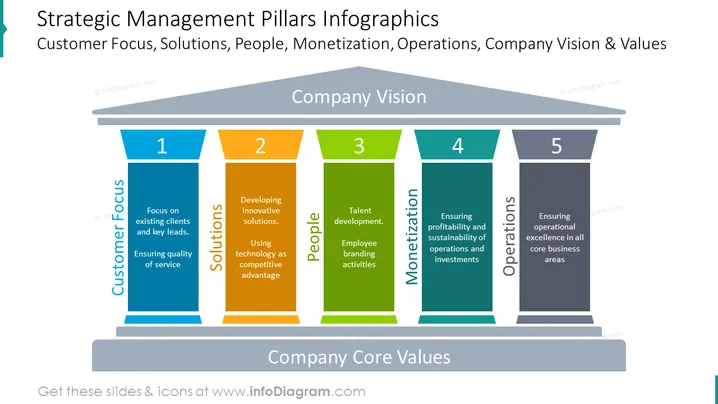
##Slide content: Strategic management pillars infographics with company core values. The first pillar shows the customer focus – existing clients and key leads, along with ensuring a quality service. The second pillar represents the solutions, like developing innovative solutions and using technology as a competitive advantage. As a third pillar, the people represent it with talent development and employee branding activities. Monetization means ensuring the profitability and sustainability of operations and investments in the fourth strategic pillar, while the last one represents the operations – ensuring operational excellence in all core business areas. Use this presentation if you are working with strategy management, and explain the core strategy that would insure a smooth workflow. You can download this template in Google Slides and Keynote too.
##Slide infographic description: Pillars Diagram, Color Coding, Enumeration List, White Background
How to Edit
How to edit text & colors

How to expand / shorten diagram

How to Replace Icons in infoDiagram PPT


