
Reviews
Your graphics add a nice touch to my presentations and I recently used them for one of my all-hands meetings. Your toolbox adds professionalism to my slides. Instead of using standard clipart.
I needed a fresh look at some of my slides. I've tried to find a way to create a paintbrush effect, to underline, accentuate, add some color and the handwritten markers were just the things. Very easy to use, easy to size, change the color. It was an affordable, perfect solution and I'm happy to recommend it.
The crisp, clean look of the graphics, and the fact that it allowed me to easily edit and change the colors to match the template was my main reason for purchasing them.
Description
Pluses versus Minuses 5 Items Evaluation Template
Slide Content
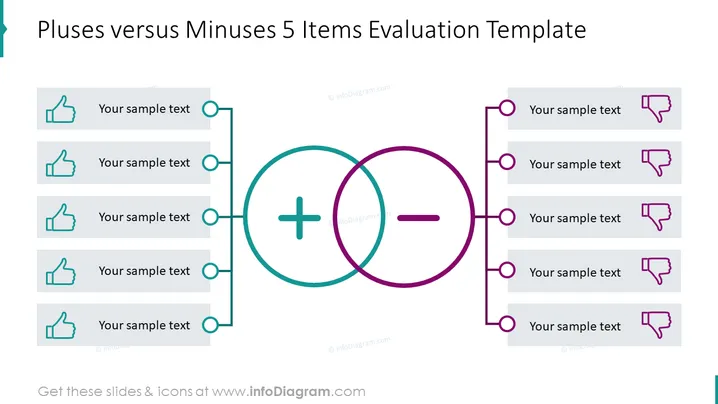
The slide illustrates a comparison between advantages and disadvantages using a balance scale represented by a Venn diagram with "plus" and "minus" signs. On the left, under the "plus" sign, there are five points each accompanied by a thumbs-up icon, suggesting positive aspects. Correspondingly on the right, under the "minus" sign, there are five points each paired with a thumbs-down icon, indicating negative aspects. This visual metaphor simplifies the evaluative process and helps in discussing different facets of an issue, item, or decision.
Graphical Look
- Two large circles in the center with a plus sign on the left circle and a minus sign on the right circle, symbolizing a comparison or balance.
- Five horizontal placeholders with a thumbs-up icon on the left, aligned vertically and linked to the plus circle with lines for listing positive points.
- Five horizontal placeholders with a thumbs-down icon on the right, aligned vertically and connected to the minus circle with lines for listing negative points.
- The placeholders are semi-transparent rectangles with rounded corners.
- The plus and minus signs are inside the circles and are in contrasting colors; the plus is in a teal/blue color, and the minus is in a purple/magenta color.
- Each placeholder has a circular bullet point matching the color of the associated circle.
The slide has a balanced and symmetrical design, with a clear differentiation between positive and negative items through the use of color and icons. The visual elements are arranged in a way that facilitates quick comprehension and comparison between the two sets of factors.
Use Cases
- To evaluate the pros and cons before making business decisions.
- As part of a SWOT analysis presentation, specifically addressing strengths (pluses) and weaknesses (minuses).
- In brainstorming sessions to generate and weigh different ideas or options.
- To summarize and present the risks and benefits of a project or investment to stakeholders.
How to Edit
How to edit text & colors

How to expand / shorten diagram

How to Replace Icons in infoDiagram PPT


