
Reviews
Sus gráficos añaden un toque agradable a mis presentaciones y recientemente los usé para una de mis reuniones generales. Su conjunto de herramientas añade profesionalismo a mis diapositivas. En lugar de usar imágenes prediseñadas estándar.
Necesitaba un aspecto fresco para algunas de mis diapositivas. Había intentado encontrar una forma de crear un efecto de pincel, de subrayar, acentuar, añadir algo de color y los marcadores escritos a mano fueron justo lo que necesitaba. Muy fácil de usar, fácil de ajustar el tamaño, cambiar el color. Fue una solución asequible y perfecta, y estoy feliz de recomendarla.
El aspecto nítido y limpio de los gráficos, y el hecho de que me permitiera editar y cambiar fácilmente los colores para que coincidieran con la plantilla fue mi principal razón para comprarlos.
Description
October (US)
Slide Content
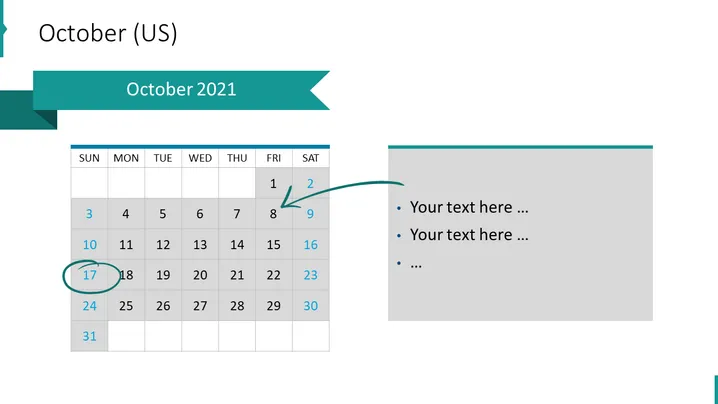
The slide presents "October 2021" and appears to be part of a calendar or schedule-related presentation. It features a calendar for the month of October 2021, with the days of the week labeled from Sunday to Saturday. Dates that have passed are shown in gray, and the current date and a highlighted date are encircled. On the right side, there are bullet points available for adding text, which would be ideal for describing events or notes corresponding to certain dates on the calendar.
Graphical Look
- The slide has a horizontal two-column layout with a calendar on the left and a text area on the right.
- The calendar is minimalistic with a white background and gray past dates.
- There are two dates circled in the calendar — one highlighted with a blue circle indicating a special event or current date, and an arrow pointing to one of the dates suggesting emphasis or importance.
- The right column has a gray background and contains three bullet points for adding custom text.
- The title ribbon on the top spans across both columns with a darker shade of teal and has a cutout arrow-like design on the right side.
The slide has a clean and professional look with a muted color scheme that focuses on organization and clarity. The balance between the calendar and the text area allows for a straightforward presentation of dates alongside corresponding notes or events.
Use Cases
- To outline key dates and deadlines in a business project timeline.
- For scheduling and presenting upcoming corporate events or holidays during a company meeting.
- To highlight important company milestones or launch dates in an investor update presentation.
- As an organizational tool within a training or educational session, indicating when certain modules or sessions will take place.
How to Edit
How to edit text & colors

How to expand / shorten diagram

How to Replace Icons in infoDiagram PPT


