

Your graphics add a nice touch to my presentations and I recently used them for one of my all-hands meetings. Your toolbox adds professionalism to my slides. Instead of using standard clipart.
Claude Jones, Director of Engineer, @Walmartlabs, USA

Your graphics add a nice touch to my presentations and I recently used them for one of my all-hands meetings. Your toolbox adds professionalism to my slides. Instead of using standard clipart.
Claude Jones, Director of Engineer, @Walmartlabs, USA
I needed a fresh look at some of my slides. I've tried to find a way to create a paintbrush effect, to underline, accentuate, add some color and the handwritten markers were just the things. Very easy to use, easy to size, change the color. It was an affordable, perfect solution and I'm happy to recommend it.
Anonymous, US
The crisp, clean look of the graphics, and the fact that it allowed me to easily edit and change the colors to match the template was my main reason for purchasing them.
Brandie Jenkins, E-learning Developer, USA
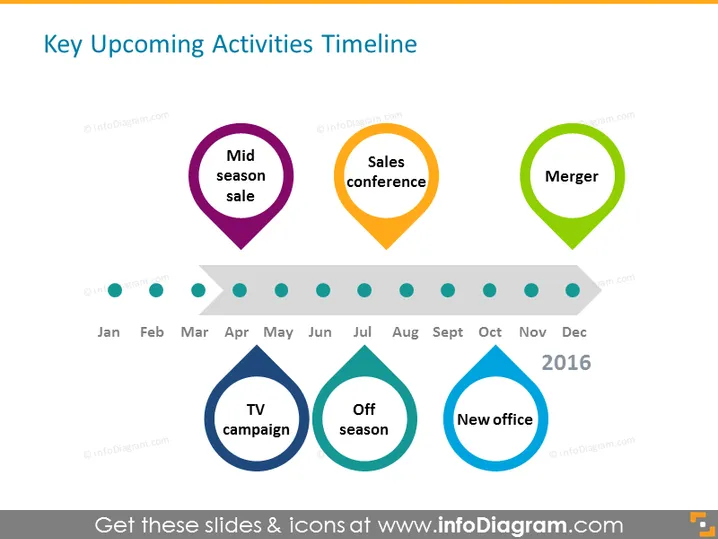
The slide depicts a timeline of key upcoming activities for a certain year, providing a visual representation of events and their projected timeframes. "Mid season sale" is scheduled for the first half of the year, implying a strategic promotion period. "Sales conference" falls in the middle, indicative of an event for networking or company sales strategy. "Merger" is positioned later in the year, suggesting a significant corporate restructuring or partnership. In the bottom half, "TV campaign," "Off season," and "New office" signify marketing efforts, a potential drop in business activity, and a physical expansion or relocation respectively, each pinpointed at different parts of the year.
The overall look is clean, minimalistic, and uses color-coding to distinguish different events efficiently. The timeline is visually easy to follow, providing an at-a-glance overview of the company's important dates and initiatives.



