
Reviews
Vos graphiques ajoutent une belle touche à mes présentations et je les ai récemment utilisés pour l'une de mes réunions générales. Votre boîte à outils ajoute du professionnalisme à mes diapositives. Au lieu d'utiliser des cliparts standards.
J'avais besoin d'un nouveau regard sur certaines de mes diapositives. J'ai essayé de trouver un moyen de créer un effet de pinceau, de souligner, d'accentuer, d'ajouter de la couleur et les marqueurs manuscrits étaient exactement ce qu'il fallait. Très facile à utiliser, facile à ajuster la taille, à changer la couleur. C'était une solution abordable et parfaite et je suis heureux de la recommander.
L'aspect net et épuré des graphiques, et le fait qu'il m'ait permis d'éditer et de changer facilement les couleurs pour les adapter au modèle, ont été les principales raisons de mon achat.
Description
United Mexican States – Map, Flag, and Info
Slide Content
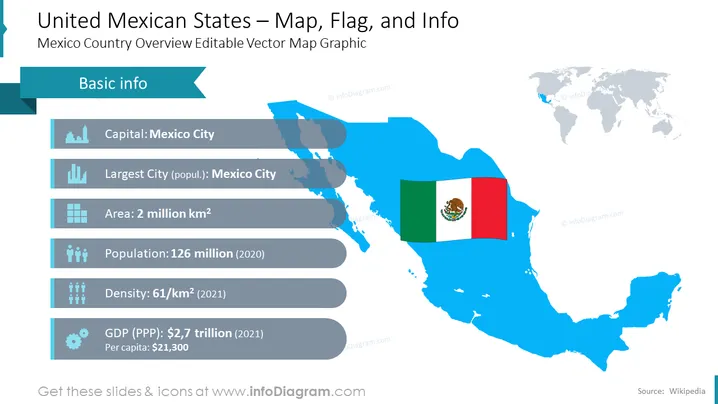
The PowerPoint slide titled "United Mexican States – Map, Flag, and Info" provides an overview of Mexico's geographical and economic data. Basic info includes the capital (Mexico City), the area (2 million km^2), population (126 million as of 2020), density (61/km^2 as of 2021), and GDP (PPP) at $2.7 trillion, with a per capita income of $21,300 in 2021. Each item is paired with an icon: a building for the capital, a chart for the largest city, a landmass for area, people figures for population and density, and a gear for GDP, indicating different aspects of the country's profile.
Graphical Look
- The slide title is located at the top of the slide in bold white lettering against a dark blue background.
- There is a medium blue banner labeled "Basic info" aligned to the left side that extends outward with a pointed, arrow-like effect.
- Iconography is used to represent each data point: a building for the capital, a chart for the largest city, a grid for the area, multiple people figures for population and density, and a gear for economic data (GDP).
- A large light blue map of Mexico fills the right two-thirds of the slide, with the Mexican flag overlaid on the northwest region of the map.
- On the upper right, there's a smaller, minimized world map with Mexico highlighted in blue.
- Data is provided beside each icon in a clear, legible font.
The slide has a clean, professional aesthetic with a predominant blue color scheme and well-organized information. The icons and map are visually appealing and contribute to the easy understanding of the content.
Use Cases
- To introduce the country's key facts and figures during an international business meeting or global conference.
- As part of an educational presentation about Mexico in a geography or international studies class.
- In a market analysis report for companies looking to invest or start business operations in Mexico.
- During tourism or cultural presentations to highlight the country's characteristics to potential visitors or partners.
How to Edit
How to edit text & colors

How to expand / shorten diagram

How to Replace Icons in infoDiagram PPT


