

Your graphics add a nice touch to my presentations and I recently used them for one of my all-hands meetings. Your toolbox adds professionalism to my slides. Instead of using standard clipart.
Claude Jones, Director of Engineer, @Walmartlabs, USA

Your graphics add a nice touch to my presentations and I recently used them for one of my all-hands meetings. Your toolbox adds professionalism to my slides. Instead of using standard clipart.
Claude Jones, Director of Engineer, @Walmartlabs, USA
I needed a fresh look at some of my slides. I've tried to find a way to create a paintbrush effect, to underline, accentuate, add some color and the handwritten markers were just the things. Very easy to use, easy to size, change the color. It was an affordable, perfect solution and I'm happy to recommend it.
Anonymous, US
The crisp, clean look of the graphics, and the fact that it allowed me to easily edit and change the colors to match the template was my main reason for purchasing them.
Brandie Jenkins, E-learning Developer, USA
##Slide content:
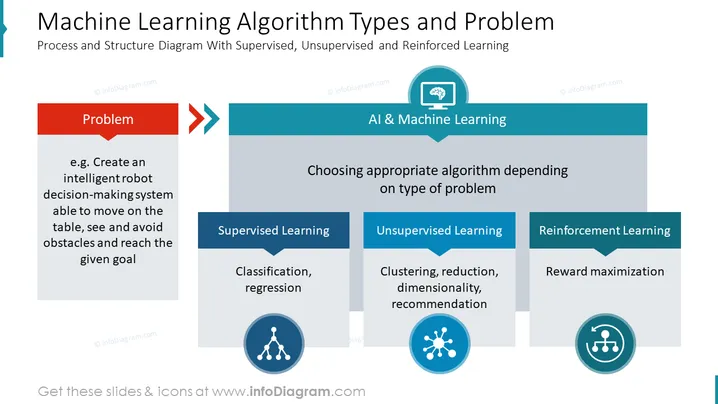
This is a machine learning algorithms chart graphic example for presenting a problem. As an example problem in this slide, we have added the challenge to create an intelligent robot decision-making system able to move on the table, see and avoid obstacles, and reach the given goal. As a solution, we will use machine learning by choosing an appropriate algorithm depending on the type of problem. The approaches can involve using supervised learning models - classification and logistic regression; or unsupervised learning techniques - clustering, reduction, dimensionality, and recommendation; or reinforcement learning e.g. neural network with reward maximization. Check the whole deck of the Artificial Intelligence and Machine Learning PowerPoint Template for more ideas.
Notice how this slide represents this problem-to-solution process by a simple decision tree structure diagram.
##Slide infographic description:
Grey Rectangular Text Blocks, Colorful Banners, Arrow Vectors, Flat Outline Icons, Machine Learning Icon, Structured Data Outline Icon, Brain Icon, Cluster Icon, Editable Vector Shapes and Graphics, White Background



