
Reviews
Ihre Grafiken verleihen meinen Präsentationen eine nette Note, und ich habe sie kürzlich für eines meiner All-Hands-Meetings verwendet. Ihre Toolbox verleiht meinen Folien Professionalität, anstatt Standard-Clipart zu verwenden.
Ich brauchte einen neuen Blick auf einige meiner Folien. Ich habe versucht, einen Weg zu finden, einen Pinselschlag-Effekt zu erzielen, um zu unterstreichen, hervorzuheben, Farbe hinzuzufügen, und die handgeschriebenen Markierungen waren genau das Richtige. Sehr einfach zu bedienen, leicht in der Größe zu ändern, die Farbe zu ändern. Es war eine erschwingliche, perfekte Lösung und ich empfehle sie gerne weiter.
Die klare, saubere Optik der Grafiken und die Tatsache, dass ich die Farben leicht bearbeiten und an die Vorlage anpassen konnte, war mein Hauptgrund für den Kauf.
Description
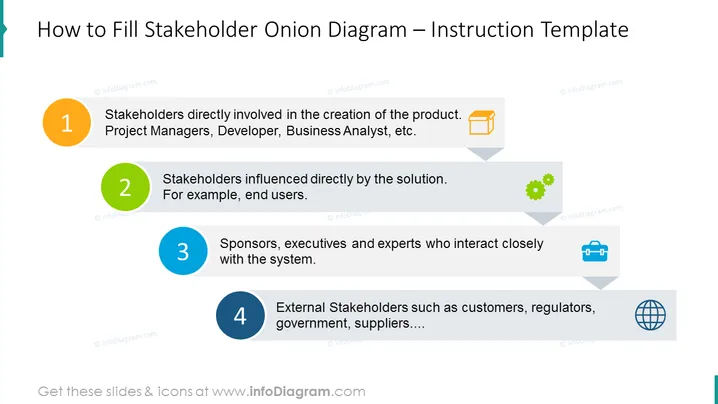
##Slide content: This slide shows detailed instructions on how to fill out the stakeholder onion diagram template. In the core of the onion layer, explain who the stakeholders are directly involved in the product creation, e.g. Project Manager, Developer, Business Analyst, etc. In the next layer, the stakeholders are influenced directly by the solution - such as the end users. The third layer shows the sponsors, executives, and experts who interact closely with the system, and the outer layer consists of external stakeholders - customers, regulators, government, supplies, etc. Hopefully, you find these instructions useful for your Stakeholder Analysis presentation. We also included detailed instructions on how to edit diagrams without quality loss. Compatible with Google Slides and Keynote. Click on the picture to see more slide ideas.
##Slide infographic description: List Diagram, Onion Layers, Flat Outline Number Icons, Box Icon, Gear Icon, Globe Icon, Suitcase Icon
How to Edit
How to edit text & colors

How to expand / shorten diagram

How to Replace Icons in infoDiagram PPT


