
Reviews
Your graphics add a nice touch to my presentations and I recently used them for one of my all-hands meetings. Your toolbox adds professionalism to my slides. Instead of using standard clipart.
I needed a fresh look at some of my slides. I've tried to find a way to create a paintbrush effect, to underline, accentuate, add some color and the handwritten markers were just the things. Very easy to use, easy to size, change the color. It was an affordable, perfect solution and I'm happy to recommend it.
The crisp, clean look of the graphics, and the fact that it allowed me to easily edit and change the colors to match the template was my main reason for purchasing them.
Description
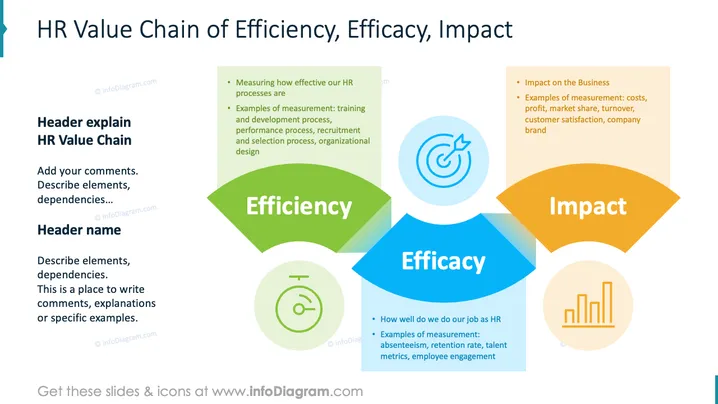
HR Value Chain of Efficiency, Efficacy, Impact
Slide Content
The slide explains the HR Value Chain focusing on three key areas: Efficiency, Efficacy, and Impact. Efficiency discusses measuring HR processes effectiveness with examples like training and recruitment processes. Efficacy highlights the quality of HR work, measured by absenteeism and employee engagement. Impact describes the business impact, with metrics like costs and market share.
Graphical Look
- Background: White with a colorful layout dividing three sections.
- Efficiency Section: Green semi-circle with a list on a light green rectangle.
- Efficacy Section: Blue trapezoid with a target icon and text underneath.
- Impact Section: Orange semi-circle with a list on a tan rectangle.
- Icons: Stopwatch icon for efficiency, target with an arrow for efficacy, and a bar graph for impact.
The overall look is clean and professional, using contrasting colors to differentiate the main topics. Icons enhance visual engagement, reinforcing content points.
Use Cases
- Present the effectiveness of HR processes.
- Discuss HR strategies and improvements in a meeting.
- Educate new HR staff about performance metrics.
- Conduct a workshop on optimizing HR impact on business.
How to Edit
How to edit text & colors

How to expand / shorten diagram

How to Replace Icons in infoDiagram PPT


