
Reviews
Your graphics add a nice touch to my presentations and I recently used them for one of my all-hands meetings. Your toolbox adds professionalism to my slides. Instead of using standard clipart.
I needed a fresh look at some of my slides. I've tried to find a way to create a paintbrush effect, to underline, accentuate, add some color and the handwritten markers were just the things. Very easy to use, easy to size, change the color. It was an affordable, perfect solution and I'm happy to recommend it.
The crisp, clean look of the graphics, and the fact that it allowed me to easily edit and change the colors to match the template was my main reason for purchasing them.
Description
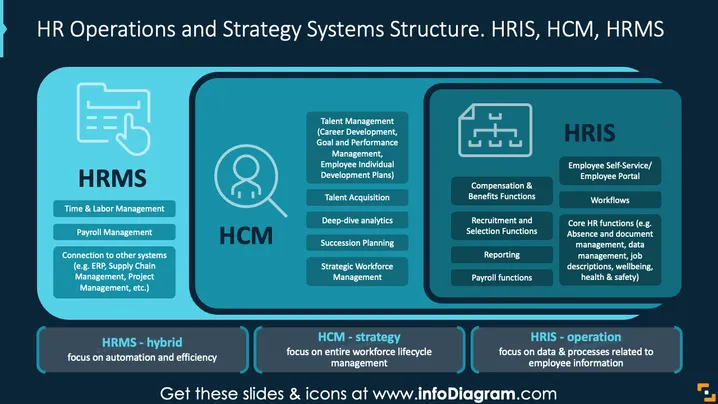
HR Operations and Strategy Systems Structure. HRIS, HCM, HRMS
Slide Content
This slide provides a comparative overview of HRMS, HCM, and HRIS systems within HR operations and strategy. HRMS focuses on time and labor management, payroll management, and system integrations. HCM emphasizes strategic workforce management, talent acquisition, and succession planning. HRIS deals with employee self-service, core HR functions, and compensation management. Each system has distinct roles in managing human resources effectively, ensuring that organizations optimize their HR operations and strategic planning.
Graphical Look
- The slide features a dark blue background with light blue and teal tones for text and graphics.
- There are three main columns, each representing HRMS, HCM, and HRIS, with respective icons above each title.
- HRMS has a checklist icon, HCM features a person silhouette within a circle, and HRIS includes an organizational chart icon.
- Each column contains rectangular segments with descriptive text on system functions.
- A lighter blue horizontal bar at the slide’s bottom provides brief definitions of each system.
- The text is neatly organized, with bold headings and color-coded sections.
The slide design is organized and visually structured to promote clarity and understanding of complex HR systems. The consistent color scheme and iconography aid in differentiating and correlating the information presented.
Use Cases
- Explaining HR software options during technology implementation discussions.
- Training sessions for HR professionals on system functionalities.
- Presenting differences in HR systems during executive meetings.
- Educating stakeholders on strategic HR management approaches.
How to Edit
How to edit text & colors

How to expand / shorten diagram

How to Replace Icons in infoDiagram PPT


