
Your graphics add a nice touch to my presentations and I recently used them for one of my all-hands meetings. Your toolbox adds professionalism to my slides. Instead of using standard clipart.
Claude Jones, Director of Engineer, @Walmartlabs, USA
Your graphics add a nice touch to my presentations and I recently used them for one of my all-hands meetings. Your toolbox adds professionalism to my slides. Instead of using standard clipart.
Claude Jones, Director of Engineer, @Walmartlabs, USA
I needed a fresh look at some of my slides. I've tried to find a way to create a paintbrush effect, to underline, accentuate, add some color and the handwritten markers were just the things. Very easy to use, easy to size, change the color. It was an affordable, perfect solution and I'm happy to recommend it.
Anonymous, US
The crisp, clean look of the graphics, and the fact that it allowed me to easily edit and change the colors to match the template was my main reason for purchasing them.
Brandie Jenkins, E-learning Developer, USA
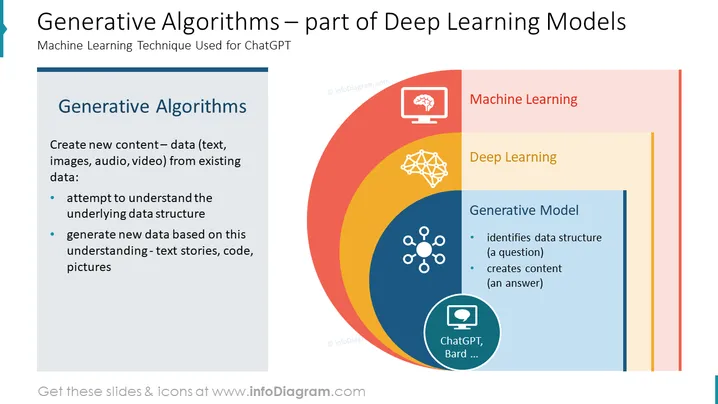
Slide Content: This PowerPoint slide is titled "Generative Algorithms – part of Deep Learning Models" and discusses the specific Machine Learning technique used for ChatGPT. The slide defines Generative Algorithms as a method to create new content—data including text, images, audio, and video—from existing data. It explains that this involves attempting to understand the underlying data structure and generating new data based on this understanding, such as text stories, code, and pictures. The slide visually represents the relationship between machine learning, deep learning, and generative models in a concentric circle diagram, and points out that generative models are a part of deep learning frameworks, which in turn fall under the broader category of machine learning. Generative models are articulated as being able to identify data structure and create content in response to a query, with ChatGPT and Bard mentioned by name as examples of generative models.
Graphical Look:
The overall look of the slide is polished and professional, with a clear hierarchy of information. The use of icons and a concentric circle diagram effectively con veys the relationship between the concepts discussed on the slide.
Use Cases:




