
Reviews
Tus diapositivas son mi 'salsa secreta' cuando se trata de visualizar mis ideas para los clientes. Estoy ahorrando tanto tiempo.
Tus diapositivas suelen generar buenos comentarios e ideas por parte de mi equipo, lo que mejora el resultado final.
Description
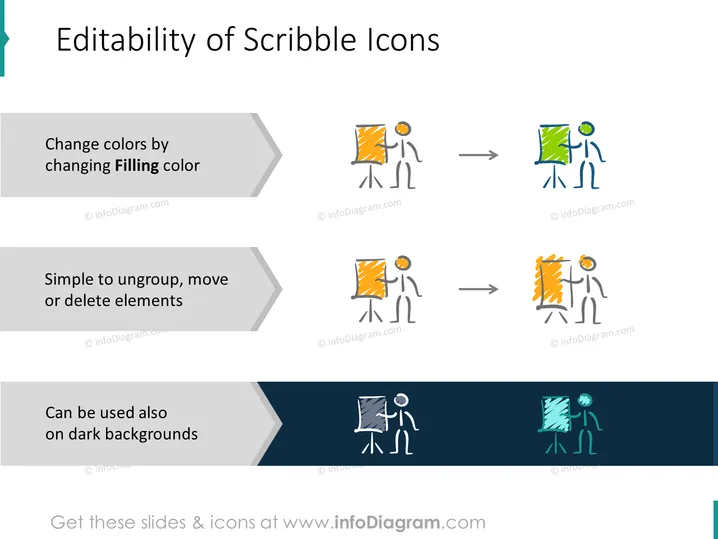
Editability of Scribble Icons
Slide Content
The slide titled "Editability of Scribble Icons" presents the customization options available for a set of drawn icon figures, highlighting their versatility for presentations. It outlines three main features:
- Change colors by changing Filling color: Illustrated by figures standing next to a colored object, showing a before and after of color alteration.
- Simple to ungroup, move or delete elements: Depicted by rearranged elements of the icon.
- Can be used also on dark backgrounds: Demonstrated by the icons against a dark background, emphasizing their adaptability.
Graphical Look
- The slide has a clean, white background with three large, horizontally placed, gray banners that contain the text descriptions.
- Each banner has a stylized arrowhead on the left side, serving as bullet points.
- Corresponding to each text description, there are sets of icons with a human figure represented in a scribble or sketch-like style.
- The icons are in sequences demonstrating the changes being described; from left to right, they show the initial and changed states.
- Arrows between the icon states imply transformative action or process.
- The bottom banner with text overlays a teal angled shape, adding visual contrast and highlighting the adaptability to different backgrounds.
- Copyright symbols are discreetly placed at the bottom left of each icon set.
The slide uses a contrasting mix of sharp angles and scribbled, hand-drawn graphics that creates a professional yet approachable look. The transformation of icons provides a clear visual representation of the editable features the slide is describing.
Use Cases
- Explaining the flexibility of presentation assets to a team during a design meeting.
- Demonstrating software features in a product demonstration or tutorial for a graphic design program.
- Offering instructions for customizing presentation materials during a training session for content creators.
- Presenting the advantages of using versatile icon sets in marketing materials to a group of brand managers.
How to Edit
How to edit text & colors

How to expand / shorten diagram

How to Replace Icons in infoDiagram PPT


