
Your graphics add a nice touch to my presentations and I recently used them for one of my all-hands meetings. Your toolbox adds professionalism to my slides. Instead of using standard clipart.
Claude Jones, Director of Engineer, @Walmartlabs, USA
Your graphics add a nice touch to my presentations and I recently used them for one of my all-hands meetings. Your toolbox adds professionalism to my slides. Instead of using standard clipart.
Claude Jones, Director of Engineer, @Walmartlabs, USA
I needed a fresh look at some of my slides. I've tried to find a way to create a paintbrush effect, to underline, accentuate, add some color and the handwritten markers were just the things. Very easy to use, easy to size, change the color. It was an affordable, perfect solution and I'm happy to recommend it.
Anonymous, US
The crisp, clean look of the graphics, and the fact that it allowed me to easily edit and change the colors to match the template was my main reason for purchasing them.
Brandie Jenkins, E-learning Developer, USA
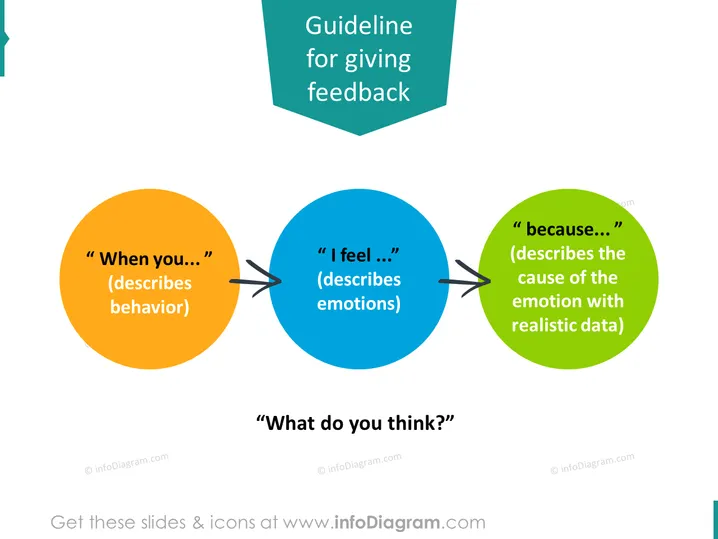
This PowerPoint slide presents a three-step process for giving feedback effectively. "When you..." initiates the feedback with a description of behavior, indicating a specific action or event that prompted the feedback. "I feel..." follows, where the speaker describes emotions elicited by the observed behavior, establishing a personal connection to the impact of the action. Finally, "because..." offers a rationale, detailing the cause of the emotion with realistic data, providing context and substantiating the feedback with concrete information. The question "What do you think?" is posited at the bottom, inviting the recipient to engage with the feedback and participate in a constructive dialogue.
The overall look of the slide is professional and user-friendly, with a vibrant color scheme to differentiate the steps of the feedback process. The design is clean and focused, which helps to ensure that the message is conveyed efficiently and effectively.




