
Reviews
Ihre Grafiken verleihen meinen Präsentationen eine nette Note, und ich habe sie kürzlich für eines meiner All-Hands-Meetings verwendet. Ihre Toolbox verleiht meinen Folien Professionalität, anstatt Standard-Clipart zu verwenden.
Ich brauchte einen neuen Blick auf einige meiner Folien. Ich habe versucht, einen Weg zu finden, einen Pinselschlag-Effekt zu erzielen, um zu unterstreichen, hervorzuheben, Farbe hinzuzufügen, und die handgeschriebenen Markierungen waren genau das Richtige. Sehr einfach zu bedienen, leicht in der Größe zu ändern, die Farbe zu ändern. Es war eine erschwingliche, perfekte Lösung und ich empfehle sie gerne weiter.
Die klare, saubere Optik der Grafiken und die Tatsache, dass ich die Farben leicht bearbeiten und an die Vorlage anpassen konnte, war mein Hauptgrund für den Kauf.
Description
Feedback summary
Slide Content
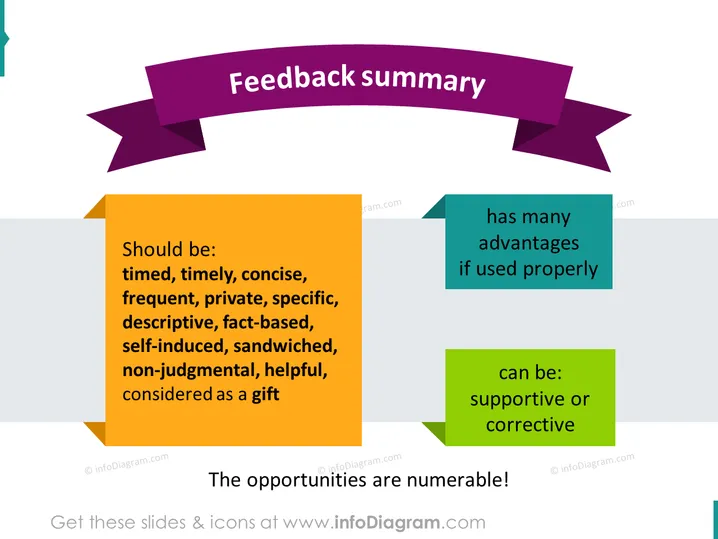
This slide provides a summary of how feedback should be approached. It asserts that feedback ought to be "timed, timely, concise, frequent, private, specific, descriptive, fact-based, self-induced, sandwiched, non-judgmental, helpful," and "considered as a gift." Each of these adjectives presents an ideal characteristic of feedback: "timed" and "timely" refer to the appropriate scheduling of feedback sessions, "concise" suggests keeping feedback direct and to the point, "frequent" implies regular intervals of providing feedback, and so on. The slide also highlights that feedback has many advantages if used properly and can be supportive or corrective, emphasizing the multifaceted role that feedback can play in different contexts.
Graphical Look
- A large, purple banner ribbon spans across the top of the slide with the title "Feedback summary".
- Beneath the banner, there are three colored rectangles containing text—orange, teal, and green—arranged diagonally from left to right.
- The orange rectangle on the left lists qualities of feedback in a bullet-point format.
- The teal rectangle in the middle states that feedback "has many advantages if used properly".
- The green rectangle on the right notes that feedback "can be: supportive or corrective".
- The overall color scheme is vibrant with each rectangle casting a slight shadow, giving a layered and dynamic effect to the slide.
The slide has a modern and dynamic feel, using vivid colors and distinct shapes to create a visually engaging presentation of the content. The shadows behind the rectangles add depth, enhancing the visual interest of the layout.
Use Cases
- During performance review meetings to outline the key attributes of constructive employee feedback.
- In a workshop or training session focused on effective communication, emphasizing the characteristics of good feedback.
- In leadership development programs to teach how feedback can be leveraged for team growth and development.
- Within team collaboration guidelines to establish a culture of open and effective feedback exchanges.
How to Edit
How to edit text & colors

How to expand / shorten diagram

How to Replace Icons in infoDiagram PPT


