
Reviews
Sus gráficos añaden un toque agradable a mis presentaciones y recientemente los usé para una de mis reuniones generales. Su conjunto de herramientas añade profesionalismo a mis diapositivas. En lugar de usar imágenes prediseñadas estándar.
Necesitaba un aspecto fresco para algunas de mis diapositivas. Había intentado encontrar una forma de crear un efecto de pincel, de subrayar, acentuar, añadir algo de color y los marcadores escritos a mano fueron justo lo que necesitaba. Muy fácil de usar, fácil de ajustar el tamaño, cambiar el color. Fue una solución asequible y perfecta, y estoy feliz de recomendarla.
El aspecto nítido y limpio de los gráficos, y el hecho de que me permitiera editar y cambiar fácilmente los colores para que coincidieran con la plantilla fue mi principal razón para comprarlos.
Description
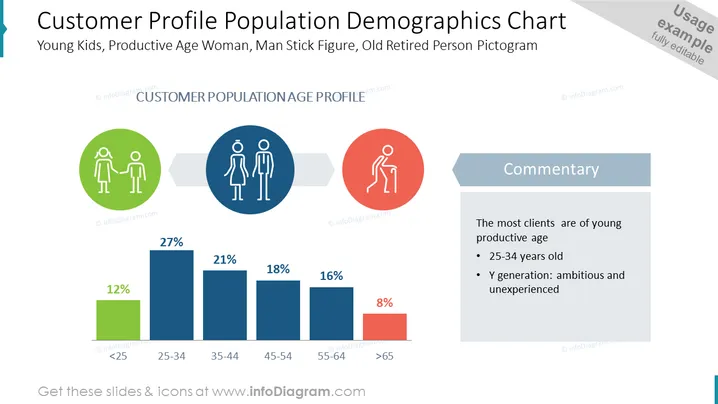
Customer Profile Population Demographics Chart
Slide Content
The slide titled "Customer Profile Population Demographics Chart" presents a demographic breakdown of a customer base by age groups and their respective percentages. The age brackets shown include <25 at 12%, 25-34 at 27%, 35-44 at 21%, 45-54 at 18%, 55-64 at 16%, and >65 at 8%. The slide suggests the majority of the clients are young and of productive age (25-34 years old), labeled as Generation Y, characterized as ambitious and inexperienced.
Graphical Look
- A large, bold title in dark blue text at the top.
- Three circular icons in a row, each within its own colored circle (green, blue, red) representing different age groups.
- A horizontal bar graph with six bars in shades of blue and red, each labeled with a percentage and an age bracket beneath it.
- A sidebar with a contrasting blue-gray background containing the heading "Commentary" in white text.
- Below the commentary heading is text reinforcing the message of the chart, elaborating on the most significant age demographic.
The slide has a clean, professional look with a good use of color to differentiate between elements and a balanced layout. The icons are simple yet informative, and the graph provides a quick visual reference to the data being presented.
Use Cases
- Presenting customer demographics in a marketing strategy meeting for tailored advertising campaigns.
- Showing a breakdown of the target audience during a product development briefing to ensure product-market fit.
- Utilizing in investor presentations to highlight the market segments predominantly served.
- Incorporating into annual reports or business plan documents to inform stakeholders of the company's clientele base.
How to Edit
How to edit text & colors

How to expand / shorten diagram

How to Replace Icons in infoDiagram PPT


