
Reviews
Sus gráficos añaden un toque agradable a mis presentaciones y recientemente los usé para una de mis reuniones generales. Su conjunto de herramientas añade profesionalismo a mis diapositivas. En lugar de usar imágenes prediseñadas estándar.
Necesitaba un aspecto fresco para algunas de mis diapositivas. Había intentado encontrar una forma de crear un efecto de pincel, de subrayar, acentuar, añadir algo de color y los marcadores escritos a mano fueron justo lo que necesitaba. Muy fácil de usar, fácil de ajustar el tamaño, cambiar el color. Fue una solución asequible y perfecta, y estoy feliz de recomendarla.
El aspecto nítido y limpio de los gráficos, y el hecho de que me permitiera editar y cambiar fácilmente los colores para que coincidieran con la plantilla fue mi principal razón para comprarlos.
Description
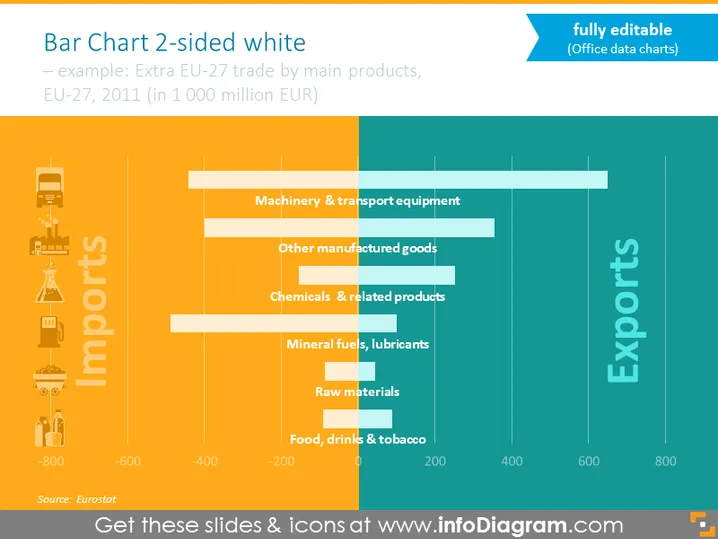
Bar Chart 2-sided white
Slide Content
The slide presents a two-sided horizontal bar chart comparing imports and exports of the EU-27 in 2011. It shows data on trade by main product categories in billion EUR. For imports, the categories are listed from the bottom as Food, drinks & tobacco; Raw materials; Mineral fuels, lubricants; Chemicals & related products; Other manufactured goods; and Machinery & transport equipment. Each of these categories shows a negative value, representing the money spent on imports. For exports, the values are positive, suggesting revenue earned.
Graphical Look
- The slide background is a gradient of dark blue to lighter blue.
- A large title "Bar Chart 2-sided white" is located at the top in white font.
- A subtitle in a smaller grey font provides context: "Example: Extra EU-27 trade by main products, EU-27, 2011 (in 1 000 million EUR)."
- A horizontal two-sided bar chart is central to the slide.
- To the left of the chart, vertically aligned text spells out "Imports," paired with icons representing different industries.
- To the right, "Exports" is written with the same style, without icons.
- The chart bars are colored in shades of orange for imports and shades of blue for exports, with darker colors for higher values.
- Small text at the bottom cites "Source: Eurostat."
- Each bar associated with a particular category on the chart is labeled with both the category name and the corresponding numerical value.
The overall look of the slide is professional and visually balanced, with a clear contrast between the import (orange) and export (blue) data. The icons and color gradation make the data easily readable and visually engaging.
Use Cases
- Presenting trade balance data in economic or business presentations.
- Illustrating import-export reports in market analysis meetings.
- Comparing industry-specific trade volumes during international trade conferences.
- Using in educational settings to teach about trade economics and data visualization techniques.
How to Edit
How to edit text & colors

How to expand / shorten diagram

How to Replace Icons in infoDiagram PPT


