
Reviews
Your graphics add a nice touch to my presentations and I recently used them for one of my all-hands meetings. Your toolbox adds professionalism to my slides. Instead of using standard clipart.
I needed a fresh look at some of my slides. I've tried to find a way to create a paintbrush effect, to underline, accentuate, add some color and the handwritten markers were just the things. Very easy to use, easy to size, change the color. It was an affordable, perfect solution and I'm happy to recommend it.
The crisp, clean look of the graphics, and the fact that it allowed me to easily edit and change the colors to match the template was my main reason for purchasing them.
Description
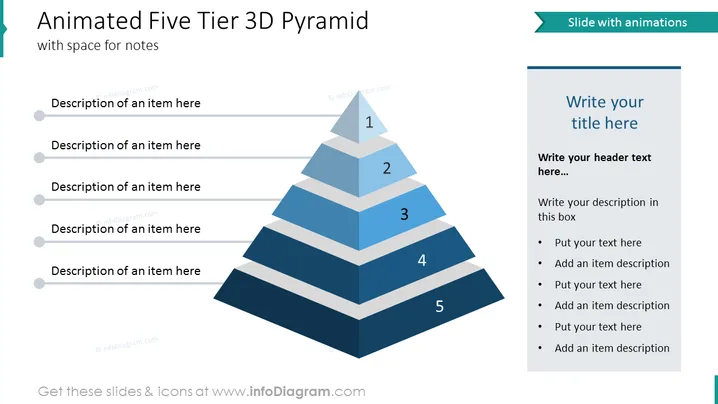
##Slide contents: The animated Five Tier 3D Pyramid Slide is designed professionally to illustrate business concepts such as workflow. You can use them in your company to illustrate process steps and organizational layers. The 3D PowerPoint pyramid template is used in many areas of business such as management and human resources. You can download and edit the tier 3D pyramid slide according to your desire. You can download it on Keynote and Google Slides. You can visualize the company's level of communication, vision, mission, strategic goals, tactics, and values. This animated 3D pyramid template is editable, allowing you to customize the design. This template for PowerPoint contains space for notes and you can format the text and select the color of the pyramid diagram. The space between levels makes it easier to visualize the sections which strengthens the 3D effect. This ppt pyramid design shows a hierarchy among any topic, process, or structure. You can use this diagram template to catch your audience's attention throughout the presentation and leave them impressed.
##Slide Infographic description:
Line Vector, 5 Tier Pyramid, Ribbon Banner, Text Block, Rectangular Shaped Text Box, White Background, Editable Shapes, Bullet Points
How to Edit
How to edit text & colors

How to expand / shorten diagram

How to Replace Icons in infoDiagram PPT


