
Reviews
Sus gráficos añaden un toque agradable a mis presentaciones y recientemente los usé para una de mis reuniones generales. Su conjunto de herramientas añade profesionalismo a mis diapositivas. En lugar de usar imágenes prediseñadas estándar.
Necesitaba un aspecto fresco para algunas de mis diapositivas. Había intentado encontrar una forma de crear un efecto de pincel, de subrayar, acentuar, añadir algo de color y los marcadores escritos a mano fueron justo lo que necesitaba. Muy fácil de usar, fácil de ajustar el tamaño, cambiar el color. Fue una solución asequible y perfecta, y estoy feliz de recomendarla.
El aspecto nítido y limpio de los gráficos, y el hecho de que me permitiera editar y cambiar fácilmente los colores para que coincidieran con la plantilla fue mi principal razón para comprarlos.
Description
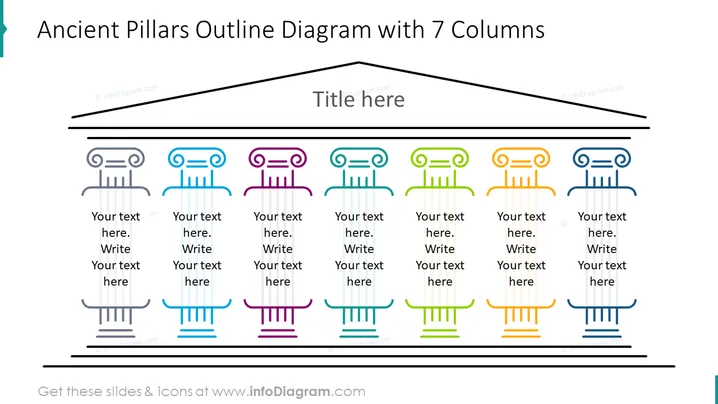
Ancient Pillars Outline Diagram with 7 Columns
Slide Content
The slide represents a diagram analogy to the Ancient Pillars, using seven stylized pillars, each colored differently and accompanied by text placeholders. Such visualization could be used to represent multiple pillars of strategy, core values, or categorical divisions within an organization. The distinct colors suggest segmentation or diverse categories, while the pillar design can invoke notions of foundational principles or strong support for overarching concepts.
Graphical Look
- Seven stylized icons of pillars, each with a unique top design and color
- Each pillar icon is followed by space for text, presumably to elaborate on the pillar it represents
- Colors ranging from purple, blue, teal, green, yellow, orange, to light blue
- The title of the slide is placed at the top-center in a larger, bolder font
- A sloping black line runs above the pillar icons, suggesting a structure or a roofline
- A thick black line both above and below the pillars unifies the design elements on the page
The slide employs a flat design with minimal shading, giving it a modern and clean appearance. The colorful pillars stand out against the white background, making it visually appealing and easy to read.
Use Cases
- To present multiple components of a business strategy or framework
- As a visual aid for describing the core values of an organization or company
- To categorize and explain different phases of a project or process
- In educational settings, to illustrate principles or pillars of a particular theory or concept
How to Edit
How to edit text & colors

How to expand / shorten diagram

How to Replace Icons in infoDiagram PPT


