
Reviews
Vos graphiques ajoutent une belle touche à mes présentations et je les ai récemment utilisés pour l'une de mes réunions générales. Votre boîte à outils ajoute du professionnalisme à mes diapositives. Au lieu d'utiliser des cliparts standards.
J'avais besoin d'un nouveau regard sur certaines de mes diapositives. J'ai essayé de trouver un moyen de créer un effet de pinceau, de souligner, d'accentuer, d'ajouter de la couleur et les marqueurs manuscrits étaient exactement ce qu'il fallait. Très facile à utiliser, facile à ajuster la taille, à changer la couleur. C'était une solution abordable et parfaite et je suis heureux de la recommander.
L'aspect net et épuré des graphiques, et le fait qu'il m'ait permis d'éditer et de changer facilement les couleurs pour les adapter au modèle, ont été les principales raisons de mon achat.
Description
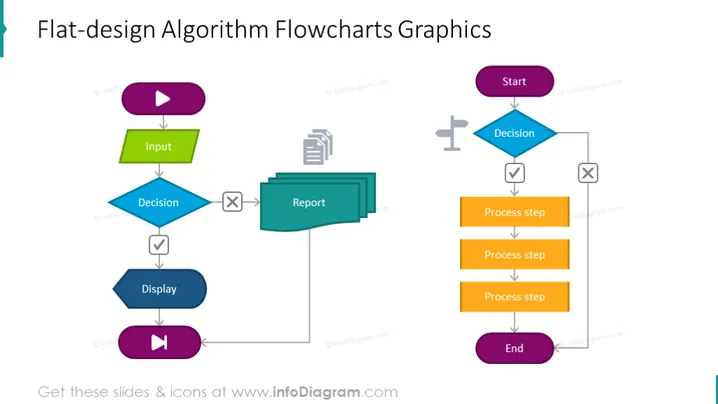
Before writing a program, it is recommended that you first establish a procedure for solving the problem at hand. Writing a program without proper pre-planning can lead to more errors. Algorithms and flowcharts are powerful tools for learning a programming language. An algorithm is a step-by-step process, whereas a flowchart explains the steps of a program in a graphical way. This flowchart algorithm presentation slide can help you clarify all the steps needed for problem-solving. If you are new to programming, it is advised that you first write an algorithm and draw a flowchart before attempting to write a program. In our slide, we have explained the process in the following way: making a decision, then explaining the process steps, which create the algorithm, and if everything is successful, end it. When you plan to start your program, check your input, make a decision and write a report about it, display it, then launch it. This slide is a part of the Flow Chart PPT PowerPoint Presentation Template deck.
##Slide Infographics description:
Flat Design Flowchart Diagram, Press Play Button Icon, Parallelogram Textbox, Rectangular Text Blocks, Arrow Line Vector, Cross Icon, Checkmark Icon, Report Icon, Flat Grey Outline Icons, Road Direction Icon, White Background
How to Edit
How to edit text & colors

How to expand / shorten diagram

How to Replace Icons in infoDiagram PPT


