
Reviews
Sus gráficos añaden un toque agradable a mis presentaciones y recientemente los usé para una de mis reuniones generales. Su conjunto de herramientas añade profesionalismo a mis diapositivas. En lugar de usar imágenes prediseñadas estándar.
Necesitaba un aspecto fresco para algunas de mis diapositivas. Había intentado encontrar una forma de crear un efecto de pincel, de subrayar, acentuar, añadir algo de color y los marcadores escritos a mano fueron justo lo que necesitaba. Muy fácil de usar, fácil de ajustar el tamaño, cambiar el color. Fue una solución asequible y perfecta, y estoy feliz de recomendarla.
El aspecto nítido y limpio de los gráficos, y el hecho de que me permitiera editar y cambiar fácilmente los colores para que coincidieran con la plantilla fue mi principal razón para comprarlos.
Description
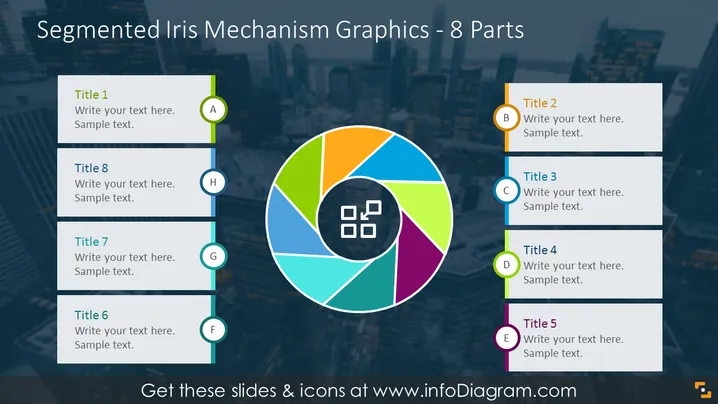
Segmented Iris Mechanism Graphics - 8 Parts
Slide Content
The slide presents a segmented iris mechanism graphic divided into 8 equal parts, where each segment represents a different component that can be labeled and described. Titles 1 through 8 are provided for each segment along with a placeholder for additional text to explain each aspect. The segments are visually connected through a circular arrangement, demonstrating the interrelated nature of the components, implying that each segment is a crucial part of a whole system or process.
Graphical Look
- Central circular multicolored graphic representing an iris mechanism, divided into 8 segments of distinct colors: blue, green, light blue, orange, pink, purple, dark blue, and teal.
- Each segment of the iris is linked to a corresponding rectangular text box labeled with a title (Title 1 to Title 8) and sample text placeholders, aligned horizontally on both sides of the circle.
- Text boxes are connected to their respective segments with a thin line that matches the segment's color, giving a sense of connectivity and order.
- Alphabetic labels (A to H) accompany each text box, with a colored circle matching the segment's color, further associating the text with the corresponding segment.
- The central part of the iris contains a gray icon with four square elements, serving as a visual center or core of the diagram.
The overall appearance of the slide is vibrant and organized, with a balanced distribution of colors and elements that guide the viewer's eye around the diagram. The logic of the design suggests clear segmentation and connectivity between the parts of a system or concept.
Use Cases
- Explaining phases in a cyclical process or steps in a continuous improvement cycle.
- Demonstrating the components of a service or product and their interdependencies.
- Visualizing a multi-faceted strategy or program where each segment contributes to the overall goals.
- Presenting the different roles or departments within an organization and how they collaborate.
How to Edit
How to edit text & colors

How to expand / shorten diagram

How to Replace Icons in infoDiagram PPT


