

Your graphics add a nice touch to my presentations and I recently used them for one of my all-hands meetings. Your toolbox adds professionalism to my slides. Instead of using standard clipart.
Claude Jones, Director of Engineer, @Walmartlabs, USA

Your graphics add a nice touch to my presentations and I recently used them for one of my all-hands meetings. Your toolbox adds professionalism to my slides. Instead of using standard clipart.
Claude Jones, Director of Engineer, @Walmartlabs, USA
I needed a fresh look at some of my slides. I've tried to find a way to create a paintbrush effect, to underline, accentuate, add some color and the handwritten markers were just the things. Very easy to use, easy to size, change the color. It was an affordable, perfect solution and I'm happy to recommend it.
Anonymous, US
The crisp, clean look of the graphics, and the fact that it allowed me to easily edit and change the colors to match the template was my main reason for purchasing them.
Brandie Jenkins, E-learning Developer, USA
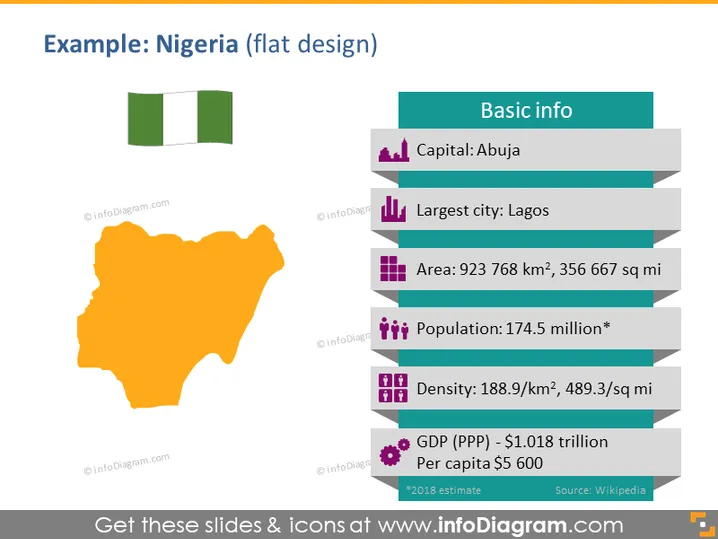
The PowerPoint slide titled "Example: Nigeria (flat design)" depicts basic information about Nigeria. The slide outlines the capital city, Abuja, and the largest city, Lagos, which is the center of the country's economic and cultural activities. It lists Nigeria's area in square kilometers and square miles, showing the vastness of the country's territory. The population is presented along with a note that it is an estimate, reflecting the dynamic nature of demographic data. The density data indicate how populated the country is per unit area. Lastly, the Gross Domestic Product (GDP) in purchasing power parity (PPP) terms and per capita income provide insight into the country's economic standing.
The slide uses minimalistic icons and a limited color palette to convey information in an intuitive and aesthetically pleasing manner. The design elements are arranged for a balanced composition, making the content easy to digest.



