
Your graphics add a nice touch to my presentations and I recently used them for one of my all-hands meetings. Your toolbox adds professionalism to my slides. Instead of using standard clipart.
Claude Jones, Director of Engineer, @Walmartlabs, USA
Your graphics add a nice touch to my presentations and I recently used them for one of my all-hands meetings. Your toolbox adds professionalism to my slides. Instead of using standard clipart.
Claude Jones, Director of Engineer, @Walmartlabs, USA
I needed a fresh look at some of my slides. I've tried to find a way to create a paintbrush effect, to underline, accentuate, add some color and the handwritten markers were just the things. Very easy to use, easy to size, change the color. It was an affordable, perfect solution and I'm happy to recommend it.
Anonymous, US
The crisp, clean look of the graphics, and the fact that it allowed me to easily edit and change the colors to match the template was my main reason for purchasing them.
Brandie Jenkins, E-learning Developer, USA
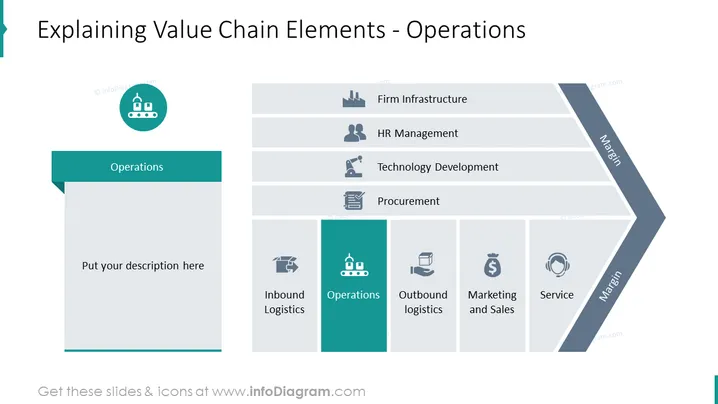
The PowerPoint slide is focused on explaining the 'Operations' element of a Value Chain. The slide gives an overview of different aspects of business operations including 'Inbound Logistics,' 'Outlet Logistics,' 'Marketing and Sales,' and 'Service,' along with other supporting activities like 'Firm Infrastructure,' 'HR Management, 'Technology Development,' and 'Procurement.' Each of these segments represents fundamental components of an efficient value chain, detailing how businesses manage their resources, develop products, and deliver them to the market, maintain their infrastructure, manage human resources, innovate through technology, and handle procurement.
The overall look of the slide is clean, modern, and professional, with a 3D graphical representation of a value chain that uses icons and color coding to enhance understanding. It effectively combines text and visuals to provide an educational overview of business operations.




