
Your graphics add a nice touch to my presentations and I recently used them for one of my all-hands meetings. Your toolbox adds professionalism to my slides. Instead of using standard clipart.
Claude Jones, Director of Engineer, @Walmartlabs, USA
Your graphics add a nice touch to my presentations and I recently used them for one of my all-hands meetings. Your toolbox adds professionalism to my slides. Instead of using standard clipart.
Claude Jones, Director of Engineer, @Walmartlabs, USA
I needed a fresh look at some of my slides. I've tried to find a way to create a paintbrush effect, to underline, accentuate, add some color and the handwritten markers were just the things. Very easy to use, easy to size, change the color. It was an affordable, perfect solution and I'm happy to recommend it.
Anonymous, US
The crisp, clean look of the graphics, and the fact that it allowed me to easily edit and change the colors to match the template was my main reason for purchasing them.
Brandie Jenkins, E-learning Developer, USA
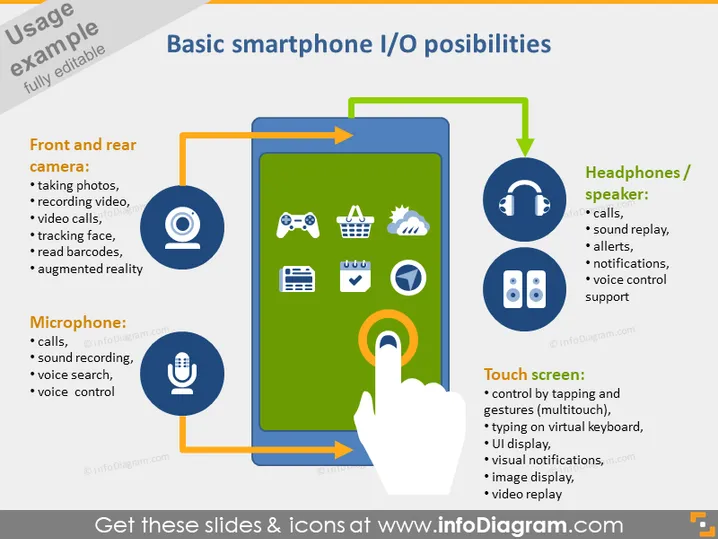
The PowerPoint slide titled "Basic smartphone I/O possibilities" outlines the input/output features of smartphones. It explains how smartphones utilize front and rear cameras for tasks like taking photos, video recording, and augmented reality; microphones for calls, sound recording, and voice control; headphones/speakers for calls, sound playback, and voice control support; and touch screens for multi-touch gestures, typing, and video replay. Each feature is highlighted with an icon and a brief explanation of its function, emphasizing the multifaceted capabilities of modern smartphones.
The slide is visually engaging and utilizes color coding and directional arrows to effectively demonstrate the relationship between various smartphone functionalities and their respective icons.




