

Your graphics add a nice touch to my presentations and I recently used them for one of my all-hands meetings. Your toolbox adds professionalism to my slides. Instead of using standard clipart.
Claude Jones, Director of Engineer, @Walmartlabs, USA

Your graphics add a nice touch to my presentations and I recently used them for one of my all-hands meetings. Your toolbox adds professionalism to my slides. Instead of using standard clipart.
Claude Jones, Director of Engineer, @Walmartlabs, USA
I needed a fresh look at some of my slides. I've tried to find a way to create a paintbrush effect, to underline, accentuate, add some color and the handwritten markers were just the things. Very easy to use, easy to size, change the color. It was an affordable, perfect solution and I'm happy to recommend it.
Anonymous, US
The crisp, clean look of the graphics, and the fact that it allowed me to easily edit and change the colors to match the template was my main reason for purchasing them.
Brandie Jenkins, E-learning Developer, USA
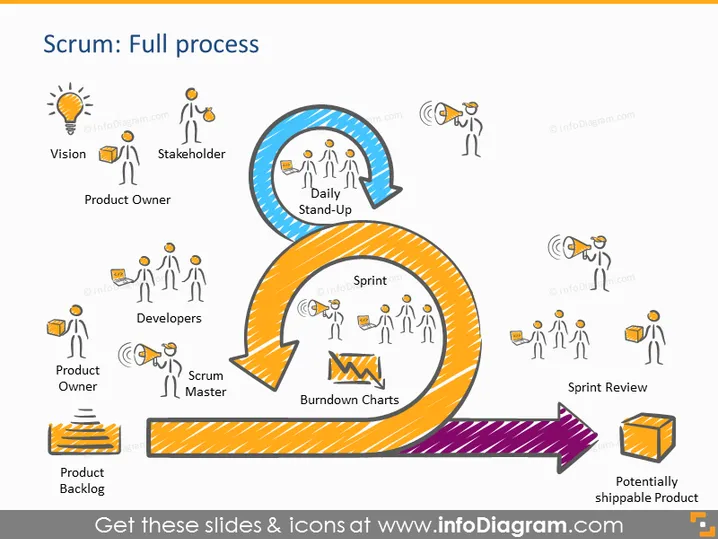
This PowerPoint slide visually represents the Scrum framework, detailing its flow from conception to completion. At the start, a lightbulb icon labelled "Vision" signifies the inception of an idea. "Stakeholder" and "Product Owner" come next, depicting those responsible for the vision. The "Daily Stand-Up" is a circular arrow highlighting regular team check-ins. The "Developers," "Scrum Master," and "Burndown Charts" denote the active work phase, with the Scrum Master facilitating and Burndown Charts tracking progress. The process ends with a "Sprint Review" and a "Potentially shippable Product," suggesting a cycle ready to repeat for continuous improvement.
The slide has a clean and vibrant appearance, utilizing colors and shapes to guide viewers through the Scrum process. Icons are clear and effectively communicate the role or concept they represent.



