

Your graphics add a nice touch to my presentations and I recently used them for one of my all-hands meetings. Your toolbox adds professionalism to my slides. Instead of using standard clipart.
Claude Jones, Director of Engineer, @Walmartlabs, USA

Your graphics add a nice touch to my presentations and I recently used them for one of my all-hands meetings. Your toolbox adds professionalism to my slides. Instead of using standard clipart.
Claude Jones, Director of Engineer, @Walmartlabs, USA
I needed a fresh look at some of my slides. I've tried to find a way to create a paintbrush effect, to underline, accentuate, add some color and the handwritten markers were just the things. Very easy to use, easy to size, change the color. It was an affordable, perfect solution and I'm happy to recommend it.
Anonymous, US
The crisp, clean look of the graphics, and the fact that it allowed me to easily edit and change the colors to match the template was my main reason for purchasing them.
Brandie Jenkins, E-learning Developer, USA
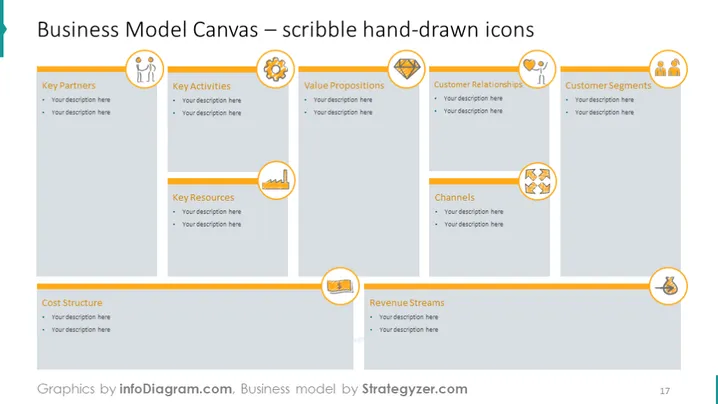
The slide is a visual representation of the Business Model Canvas with a creative twist, using scribbled hand-drawn icons to represent each of the nine building blocks: Key Partners, Key Activities, Value Propositions, Customer Relationships, Customer Segments, Channels, Key Resources, Cost Structure, and Revenue Streams. Each section has bullet points for adding custom descriptions to tailor the canvas to a specific business model, making it a dynamic tool for strategic planning and presentation.
The slide uses an informal and engaging design with playful icons that add a human touch to the strategic planning process. The layout is structured yet approachable, encouraging user interaction.



