

Your graphics add a nice touch to my presentations and I recently used them for one of my all-hands meetings. Your toolbox adds professionalism to my slides. Instead of using standard clipart.
Claude Jones, Director of Engineer, @Walmartlabs, USA

Your graphics add a nice touch to my presentations and I recently used them for one of my all-hands meetings. Your toolbox adds professionalism to my slides. Instead of using standard clipart.
Claude Jones, Director of Engineer, @Walmartlabs, USA
I needed a fresh look at some of my slides. I've tried to find a way to create a paintbrush effect, to underline, accentuate, add some color and the handwritten markers were just the things. Very easy to use, easy to size, change the color. It was an affordable, perfect solution and I'm happy to recommend it.
Anonymous, US
The crisp, clean look of the graphics, and the fact that it allowed me to easily edit and change the colors to match the template was my main reason for purchasing them.
Brandie Jenkins, E-learning Developer, USA
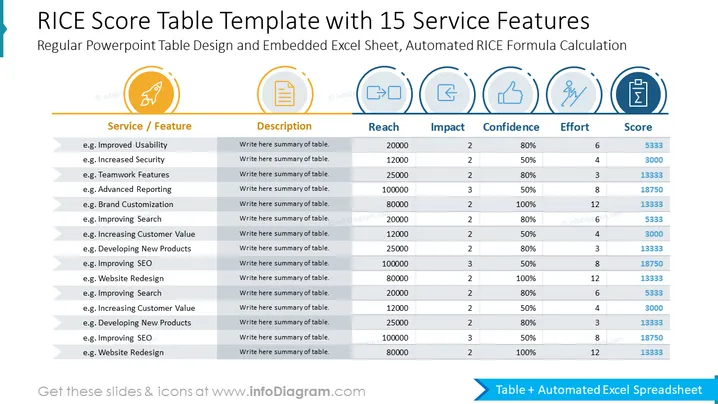
This PowerPoint slide is titled "RICE Score Table Template with 15 Service Features" and is essentially a structured evaluation tool designed to assess service features or project ideas. The RICE scoring system considers four factors: Reach, Impact, Confidence, and Effort, each with associated numerical values to calculate a composite 'Score'. 'Reach' quantifies how many users are affected, 'Impact' evaluates the potential effect, 'Confidence' measures certainty in the estimates, and 'Effort' denotes the amount of work required. The template lists examples like "Improved Usability", "Increased Security", and "Developing New Products", with placeholders for descriptions and RICE metrics.
The slide has a professional and clean look with a well-organized table layout. Icons and shading enhance the visual appeal and facilitate understanding of the data components.



