

Your graphics add a nice touch to my presentations and I recently used them for one of my all-hands meetings. Your toolbox adds professionalism to my slides. Instead of using standard clipart.
Claude Jones, Director of Engineer, @Walmartlabs, USA

Your graphics add a nice touch to my presentations and I recently used them for one of my all-hands meetings. Your toolbox adds professionalism to my slides. Instead of using standard clipart.
Claude Jones, Director of Engineer, @Walmartlabs, USA
I needed a fresh look at some of my slides. I've tried to find a way to create a paintbrush effect, to underline, accentuate, add some color and the handwritten markers were just the things. Very easy to use, easy to size, change the color. It was an affordable, perfect solution and I'm happy to recommend it.
Anonymous, US
The crisp, clean look of the graphics, and the fact that it allowed me to easily edit and change the colors to match the template was my main reason for purchasing them.
Brandie Jenkins, E-learning Developer, USA
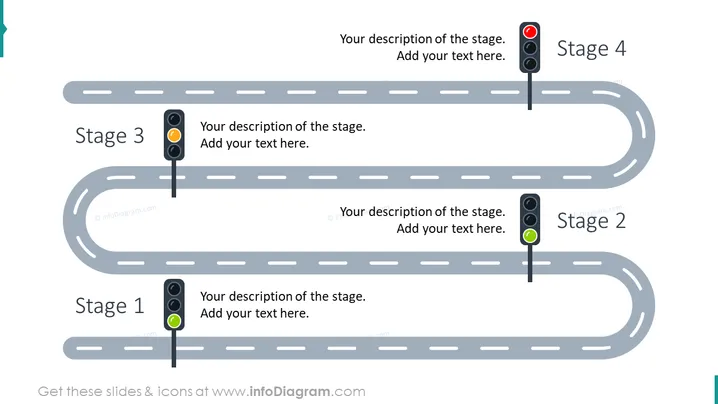
##Slide contents: The Project Stages Roadmap Slide shows a creative and professional project roadmap template. You can use the Roadmap PowerPoint Template if you are a project manager or project planner who wants to demonstrate a project stages roadmap in a PowerPoint Presentation. This roadmap PowerPoint template is easy to use and helps your team know the status of your project tasks. It gives you an overview of your project stages journey. It plays an important part in your business strategy and you can use the product roadmap template to present product development roadmaps, business roadmaps, sales, and marketing. This PowerPoint template is presented in the form of a timeline that will demonstrate project tasks and milestones. It helps you accomplish your business goal and mission by using creative traffic signal graphics. This simple roadmap PPT is made up of four stages. In each stage, you can write a brief description. There are also traffic lights next to each stage to showcase the status of each phase. The green color means that the stage is complete and there are no issues. The amber color means that there is something incomplete that needs further investigation. The red color shows that there is a problem that needs to be solved to finish the phase. You can download and edit this slide in Google Slides and Keynote too, without quality loss. ##Slide Infographic Description: White Background, Road Picture, Text Box, Traffic Lights Graphics, RAG Traffic Lights Graphics, Green Color, Amber Color, Red Color



