
Your graphics add a nice touch to my presentations and I recently used them for one of my all-hands meetings. Your toolbox adds professionalism to my slides. Instead of using standard clipart.
Claude Jones, Director of Engineer, @Walmartlabs, USA
Your graphics add a nice touch to my presentations and I recently used them for one of my all-hands meetings. Your toolbox adds professionalism to my slides. Instead of using standard clipart.
Claude Jones, Director of Engineer, @Walmartlabs, USA
I needed a fresh look at some of my slides. I've tried to find a way to create a paintbrush effect, to underline, accentuate, add some color and the handwritten markers were just the things. Very easy to use, easy to size, change the color. It was an affordable, perfect solution and I'm happy to recommend it.
Anonymous, US
The crisp, clean look of the graphics, and the fact that it allowed me to easily edit and change the colors to match the template was my main reason for purchasing them.
Brandie Jenkins, E-learning Developer, USA
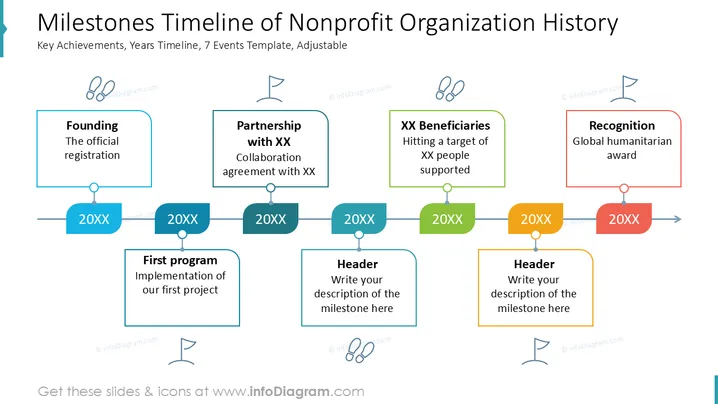
The slide shows a timeline of significant events in a nonprofit's history. "Founding" marks the official start, followed by a "Partnership with XX" indicating collaboration agreements. "XX Beneficiaries" highlights the target number of supported people. "Recognition" denotes receiving a global humanitarian award. "First program" describes implementing the first project. Two additional header boxes are provided for custom milestone descriptions.
The overall look is clean and structured, making it easy to follow the nonprofit's historical milestones. The use of colors helps differentiate between various events.




