
Your graphics add a nice touch to my presentations and I recently used them for one of my all-hands meetings. Your toolbox adds professionalism to my slides. Instead of using standard clipart.
Claude Jones, Director of Engineer, @Walmartlabs, USA

Your graphics add a nice touch to my presentations and I recently used them for one of my all-hands meetings. Your toolbox adds professionalism to my slides. Instead of using standard clipart.
Claude Jones, Director of Engineer, @Walmartlabs, USA

I needed a fresh look at some of my slides. I've tried to find a way to create a paintbrush effect, to underline, accentuate, add some color and the handwritten markers were just the things. Very easy to use, easy to size, change the color. It was an affordable, perfect solution and I'm happy to recommend it.
Anonymous, US
The crisp, clean look of the graphics, and the fact that it allowed me to easily edit and change the colors to match the template was my main reason for purchasing them.
Brandie Jenkins, E-learning Developer, USA
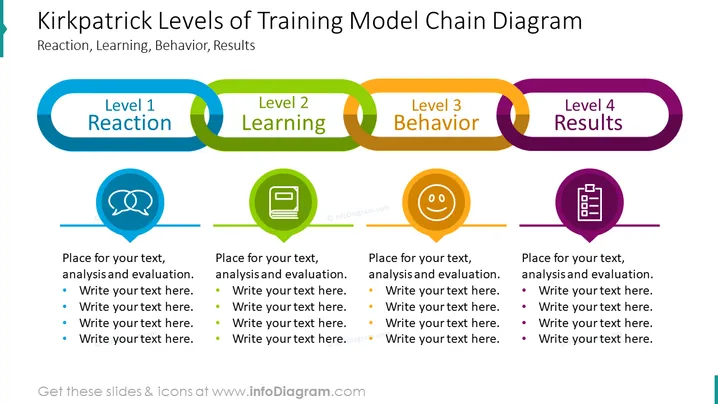
##Slide content: Kirkpatrick model PPT infographic slide with chain diagram presenting the four levels of training. These levels are reaction, learning, behavior, and results. We placed a different color for each level, with a corresponding representative icon for better distinguishment and a cleaner-looking presentation. We left out space under each section, so you can add a short description with several key points. You can change the graphics and the colors however it fits you. If you don't know how there are video instructions that you may find useful. You can download the presentation in Google Slides and Keynote, without losing the quality of the elements. Click on the picture to see the whole Instructional Design Models PowerPoint Template for more ideas.
##Slide infographic description: Chain Diagram, Speech Bubbles Outline Icon, Book Icon, Smile Emoji Icon, Checklist Icon, Bullet Points, Color Coding, Line Vector


