

Your graphics add a nice touch to my presentations and I recently used them for one of my all-hands meetings. Your toolbox adds professionalism to my slides. Instead of using standard clipart.
Claude Jones, Director of Engineer, @Walmartlabs, USA

Your graphics add a nice touch to my presentations and I recently used them for one of my all-hands meetings. Your toolbox adds professionalism to my slides. Instead of using standard clipart.
Claude Jones, Director of Engineer, @Walmartlabs, USA
I needed a fresh look at some of my slides. I've tried to find a way to create a paintbrush effect, to underline, accentuate, add some color and the handwritten markers were just the things. Very easy to use, easy to size, change the color. It was an affordable, perfect solution and I'm happy to recommend it.
Anonymous, US
The crisp, clean look of the graphics, and the fact that it allowed me to easily edit and change the colors to match the template was my main reason for purchasing them.
Brandie Jenkins, E-learning Developer, USA
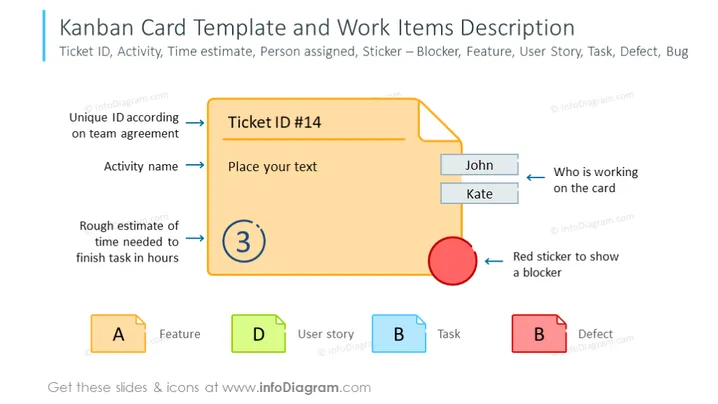
This PowerPoint slide provides a visual guide for creating a Kanban card template, outlining necessary components such as Ticket ID, Activity name, and Time estimate to finish a task. For instance, “Unique ID according to team agreement” might imply the use of an agreed-upon numbering system to identify tasks, while “Rough estimate of time needed to finish task in hours” suggests each task should come with an anticipated duration. It also indicates who is working on the card, represented by names like "John" or "Kate", and utilizes a visual marker, a red sticker, to denote a blocker which may impede progress.
The overall look of the slide is colorful and organized, with clear visual connections between the descriptive text and the sections of the Kanban card they reference. The distinct colors and shapes help to differentiate various elements of the Kanban system.



