
Your graphics add a nice touch to my presentations and I recently used them for one of my all-hands meetings. Your toolbox adds professionalism to my slides. Instead of using standard clipart.
Claude Jones, Director of Engineer, @Walmartlabs, USA
Your graphics add a nice touch to my presentations and I recently used them for one of my all-hands meetings. Your toolbox adds professionalism to my slides. Instead of using standard clipart.
Claude Jones, Director of Engineer, @Walmartlabs, USA
I needed a fresh look at some of my slides. I've tried to find a way to create a paintbrush effect, to underline, accentuate, add some color and the handwritten markers were just the things. Very easy to use, easy to size, change the color. It was an affordable, perfect solution and I'm happy to recommend it.
Anonymous, US
The crisp, clean look of the graphics, and the fact that it allowed me to easily edit and change the colors to match the template was my main reason for purchasing them.
Brandie Jenkins, E-learning Developer, USA
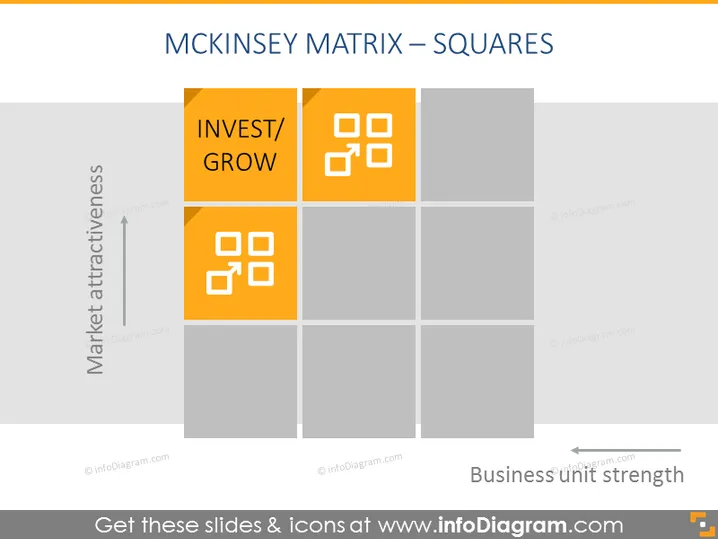
The slide presents the McKinsey Matrix, also known as the General Electric Matrix or GE-McKinsey Nine-Box Matrix. This strategic tool is used to prioritize investments among various business units or product lines. The matrix divides the entities into three categories based on two dimensions: Market Attractiveness and Business Unit Strength. In the slide, only one category is labeled: the top-right squares are highlighted in orange and labeled 'INVEST/GROW,' signifying a high market attractiveness and strong business unit strength.
The overall look of the slide is minimalist and corporate, with a focus on function over form. The use of color highlights the recommended strategic action area, while the icons offer a visual cue about the activities or processes relevant to the 'INVEST/GROW' category.




