
Your graphics add a nice touch to my presentations and I recently used them for one of my all-hands meetings. Your toolbox adds professionalism to my slides. Instead of using standard clipart.
Claude Jones, Director of Engineer, @Walmartlabs, USA
Your graphics add a nice touch to my presentations and I recently used them for one of my all-hands meetings. Your toolbox adds professionalism to my slides. Instead of using standard clipart.
Claude Jones, Director of Engineer, @Walmartlabs, USA
I needed a fresh look at some of my slides. I've tried to find a way to create a paintbrush effect, to underline, accentuate, add some color and the handwritten markers were just the things. Very easy to use, easy to size, change the color. It was an affordable, perfect solution and I'm happy to recommend it.
Anonymous, US
The crisp, clean look of the graphics, and the fact that it allowed me to easily edit and change the colors to match the template was my main reason for purchasing them.
Brandie Jenkins, E-learning Developer, USA
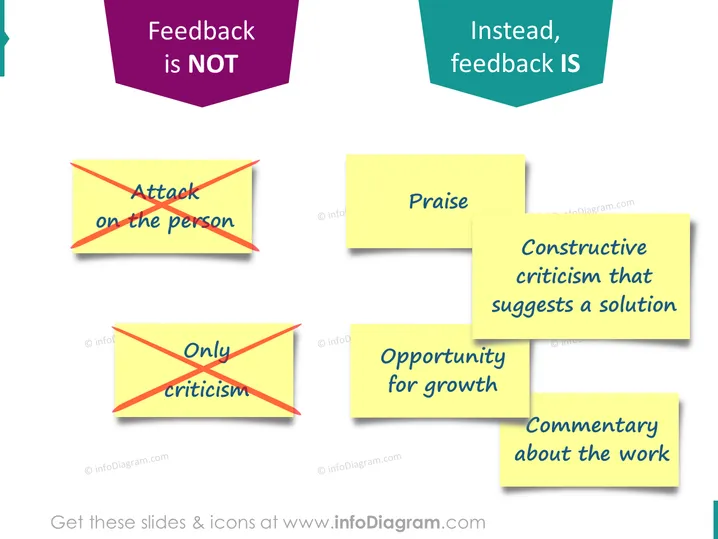
The PowerPoint slide juxtaposes ineffective and effective feedback practices. On the left, under the header "Feedback is NOT," are examples of unproductive feedback: "Attack on the person" and "Only criticism," both indicative of personal attacks and unconstructive negativity that hamper collaboration and learning. On the right, under "Instead, feedback IS," are exemplified effective feedback techniques: "Praise," "Constructive criticism that suggests a solution," "Opportunity for growth," and "Commentary about the work," which encourage positive reinforcement, collective problem-solving, development opportunities, and focus on the task.
The overall look is vibrant and engaging, with the contrasting colors and post-it note graphics effectively highlighting the do's and don'ts of giving feedback. The use of shadows adds depth to the visuals on the slide.




